2.8 Origin GUI Modes
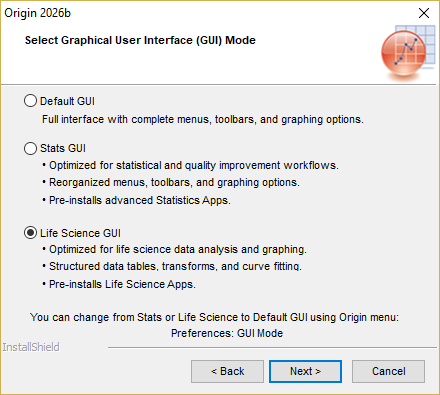
Origin offers 3 GUI modes when during installation:
- Default mode: Origin's classic interface with complete menus, toolbars, buttons, and graphing options.
- Stats mode: pre-installs a collection of Apps and enables an interface tailored for statistical analysis and quality-control workflows.
- Life Science mode: pre-installs Apps and arranges the interface to streamline pharmacological and biological assay workflows (e.g., dose-response curves, ANOVA and survival analysis).
Therefore...
 | if you cannot find a menu or button, or have difficulty following instructions in our documentation, |
1. check if you installed in Stats mode or Life Science mode
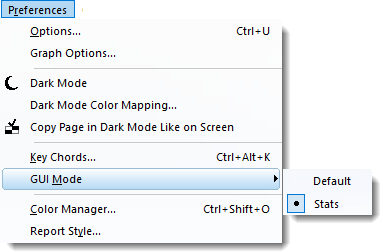
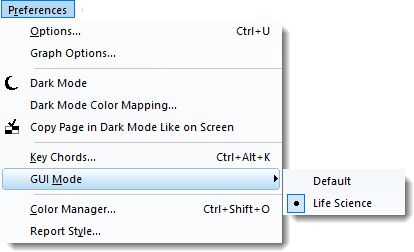
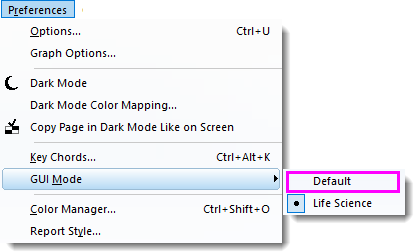
- you can check GUI mode by menu Preferences: GUI Mode:</to>
| If you install Stats mode... | If you install Life Science mode... |
|---|---|
|
|
2. If so, you can either:
Switch to Default mode
You can switch to Default mode by selecting menu Preferences: GUI Mode: default.

Use Search bar
Enter menu or button name in Search bar next to main menu to find the relevant menu, button, etc.