
You need to have at least one Y column as input data.
Optionally, you can have an additional associated Y error column for each Y column.
Select Plot > Categorical: Grouped Histogram... menu items to open the plot_ghist dialog:
In the dialog that opens, select the input data range. Add at least one group column and determine where to put the calculated data. You can then generate a grouped histogram plot.
You can refer to the section below for the detailed dialog controls:
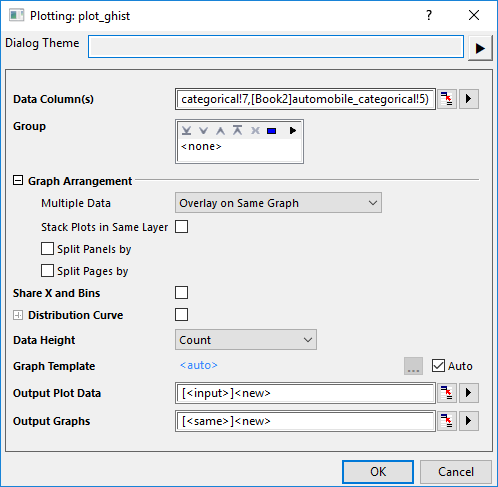
| Data Column(s) | This branch is used to specify the input data. |
|---|---|
| Group | Choose grouping columns to divide the input data into multiple plots. |
| Graph Arrangement |
|
| Share Y | When multiple columns ae selected as Input, and Multiple Data is set to Seperate Layers on Same Graph, you can check this box to make the multiple layers on same graph share the Y axis scale. |
| Share X and Bins | Check this box to share X scale and binning settings between different layers and different graphs. |
| Distribution Curve | Specify whether to add distribution curves on the histograms.
You can check more details about distribution curves in the Distribution tab of Plot Details dialog. |
| Hide Bins | Once the distribution curve has been added, you can check this box to hide the histogram bars. |
| Data Height | Specify a data as bar height. You can refer to the Data Height control in Data tab of Plot Details dialog. |
| Graph Template | Specify a user template if needed. By default, the Auto check box is checked and the built-in template Hist is used. |
| Output Plot Data | Specify where to output the calculated data. |
| Output Graphs | Specify which sheet the result graphs is output to. |
In addition, you can preview the final graph in this dialog.
| Note: In order not to sort the grouping range with default alphabetical order, set it(them) as categorical and modify the orders in the Categories tab. |
Hist.otpu (installed to the EXE folder of Origin)
You are allowed to select multiple columns for Group, Split Panels by and Split Page by box.
| Minimum Version: Origin 2026 |