8.13.5 The Merge Graphs to Layout Dialog Box
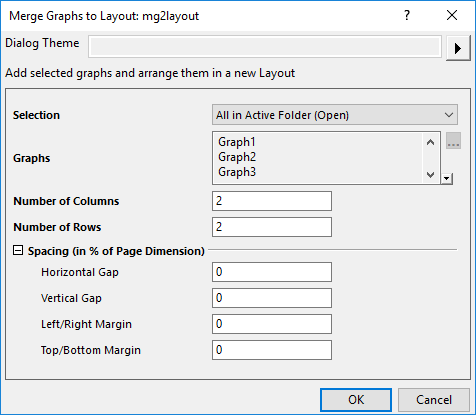
The Merge Graphs to Layout Dialog is a simpler tool to merge the specified graphs into a layout window.
If you want to do some advanced settings during merging the graphs, you are supposed to use the Merge Graph Windows tool instead.
Selection
Specify which graphs will be listed in Graphs box and merged into the layout.
| Active Page | All graphs in the active page. |
|---|---|
| All in Active Folder | All graphs in the active folder, excluding those in the subfolders. |
| All in Active Folder (Open) | All open graphs in the active folder. |
| All in Active Folder (Include Embedded) | All graphs in the active folder, including the embedded graphs. |
| Specified | With this item selected, you can edit the graph list in Graphs box |
Graphs
Once when Specified is selected for Selection drop-down list, you are allowed to customize the graph list. Click the button  beside the list box to open the Graph Browser to select more graphs.
Number of Columns/Rows
Specify the number of rows/columns in the new graph. The graphs will be arranged on a row by col grid in the new window.
Spacing(in % of Page Dimension)
Specify the spacing between and around the graphs, which is based on the page dimension of the source graphs.
This option is similar with the Spacing branch of Merge Graph Window dialog which is based on the target graph window.