8.13.2 The Layer Management Dialog Box
 See more related videos:Add a second axis, Merging and Arranging Graphs, Add, remove or reorder data plots, Linking Graph Layers, Managing Layers
The Layer Manegement tool is used to manage the layers in the active graph by adding, editing, arranging and linking layers. It consists of three panels: Layer Selection, Settings and Preview.
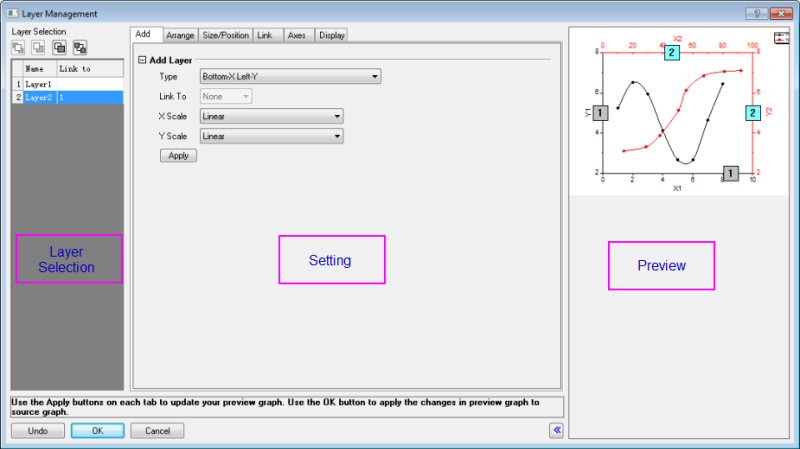
Layer Selection panel
The left panel, or the Layer Selection panel, lists all the layers in the graph. It can be used to:
- Rename a layer: Double-click the layer name to rename a layer
- Delete a layer: Right-click the layer index or name and select Delete Layer from the short-cut menu.
- Reorder the layers by either following way:
- Drag the layer index up and down to change the layer index numbers
- Click a groups buttons includes Bring to Font
 , Bring Forward
  , Push Backward
  and Push to Back
Note that the positions of the layers will not be affected.
The Layer Selection panel can also be used to select the particular layers on which specific operations in the Settings panel are performed.
Settings panel
This panel contains five tabs:
On each tab there is an Apply button. After changing the settings, click this button to update your changes to the preview graph. Note that the source graph is not affected.
Preview panel
The operations on Layer Selection panel and Settings panel will be applied to the Preview panel.
Undo, OK, Cancel buttons
These three buttons locate near the bottom of the Layer Management tool.
- The Undo button is used to undo any operations which have been applied to the preview graph. Multiple undo operations are supported. You can click this button several times to undo multiple operations.
- The OK button is used to perform all the operations, which have been applied to the preview graph, to the active graph and close the Layer Management dialog.
- The Cancel button is used to cancel all the operations, which have been applied to the preview graph. The operations will not be applied to the active graph. In other words, the active graph will remain as it was before the Layer Management dialog was opened. Clicking the Cancel button will also close the Layer Management dialog.