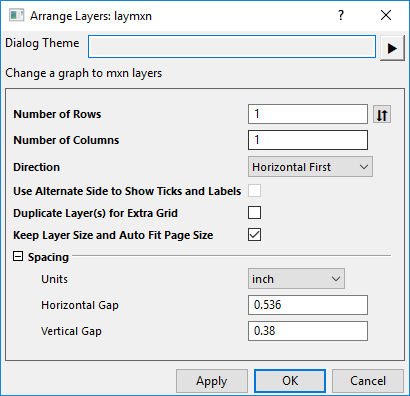
The Arrange Layers tool is used to change a graph to m*n layers.
To open this dialog:
 on Page level Mini Toolbar
| Number of Rows |
This tool assumes that you want to arrange your layers in an N by M grid. You can use this box to specify M--the number of rows in the grid. | |
|---|---|---|
| Number of Columns |
This tool assumes that you want to arrange your layers in an N by M grid. You can use this box to specify N--the number of columns in the grid. | |
| Direction |
This tool specifies the direction for arranging graph layers in N by M grid.
| |
| Use Alternate Side to Show Ticks and Labels |
Specifies whether to show Axis Ticks and Labels on left and right side (bottom and top) alternately in the graph layers.
| |
| Duplicate Layer(s) for Extra Grid | Specify whether or not to create additional layers required to fill out the N by M grid.
If the Number of Rows x Number of Columns is bigger than existing number of layers in current graph, you can choose this box to duplicate the layers in sequence.
| |
| Keep Layers Size and Auto Fit Page Size | Specifies whether to keep layers size and auto fit page size. | |
| Page Size |
When unchecked Keep Layers Size and Auto Fit Page Size, Page Size branch is showed. You can customize the graph page size.
| |
| Spacing |
|
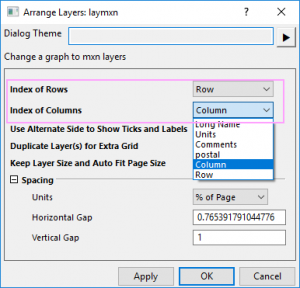
| Note:When the graph is a Tile Grid Map, Number of Rows and Number of Columns will change to Index of Rows and Index of Columns which are drop-down lists to let you select a column label row of source data to arrange the layers. And the Direction option will be hidden.
|