 See more related video:Origin VT-0015 FFT
See more related video:Origin VT-0015 FFT
The FFT Gadget in Origin provides a simple and quick way to examine the frequency spectrum of data plotted in a graph. A region of interest (ROI) control can be used to select a desired range of the data to be analyzed. The FFT spectrum is displayed in a separate preview graph window, and is dynamically updated as the ROI object is moved or resized. The Amplitude axis scale of the FFT result graph can be switched between linear and log scales.
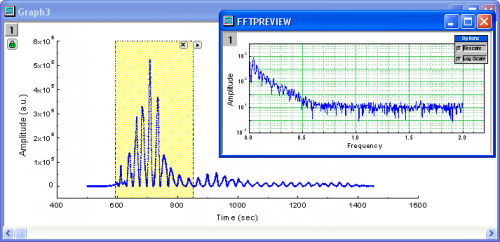
Origin also provides an FFT tool with an extensive set of options for performing more detailed Fourier analysis.
To use this tool, select Gadgets: FFT from the Origin menu when a graph is active.
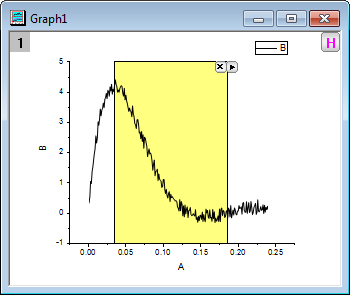
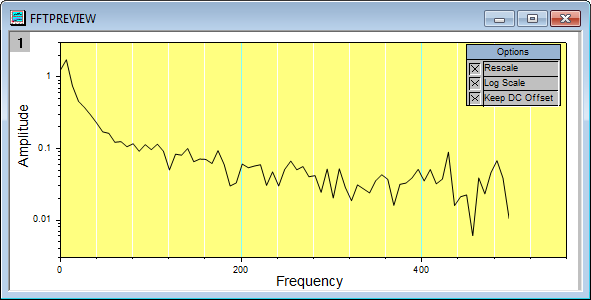
This function is used to add a rectangle onto a plot to perform FFT. Moving this rectangle, you can observe the FFT effect of the data quickly in the FFTPREVIEW window. All the default settings to perform the FFT are the same as in fft1. Please see this table below.
| Window | Rectangle |
|---|---|
| Shift | 1 |
| Unwrap phase | 1 |
| Factor | -1 (Electrical Engineering) |
| Spectrum Type | <auto> |
| Normalize power to | MSA-Mean Square Amplitude |
There is a floating Options panel, whose default location is near the top right corner of the FFTPREVIEW window. With it, you can customize the preview graph.
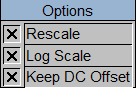
| Rescale | If you check this box, the graph in the FFTPREVIEW window will rescale automatically when you move the rectangle. |
|---|---|
| Log Scale | If you check this box, the type of the Y-axis will be log 10 base. Uncheck it will turn the type of the Y-axis back to linear. |
| Keep DC Offset | If you want to remove DC offset, clear this check box. |
Click the triangle button on the right side of the ROI object to open the associated context menu. Selecting Preferences from the menu will open the FFT Preferences dialog, allowing you to customize the ROI object.
| Show Tool Name (toolname) |
Specify whether to show the tool name on the ROI object. The tool name can be specified if this check box is selected. |
|---|---|
| Fill Color (rectcolor) |
Specify the color of the ROI object. |
Please refer to fft1 algorithm.