30.1.21 The Folders and Windows Toolbar
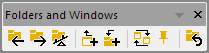
The Folders and Windows Toolbar buttons provide quick access to navigate folders.

|
Folder Backward. |

|
Folder Forward. |

|
Return to the previous folder |

|
Add active window shortcut in previous folder. (Ctrl+Shift+F7)
|

|
Open Add Shortcuts to Active Folder dialog, you can Choose type of window from the previous folder to show in current folder (shortcuts) |

|
Arrange Windows |

|
Exclude Window from Arrange Windows. |

|
Go to Original Folder |