15.3.7.3 Nonlinear Implicit Curve Fitting (Pro Only)
Origin's NLFit tool supports implicit fitting using the Orthogonal Distance Regression (ODR) algorithm, including fitting with X and/or Y error data.
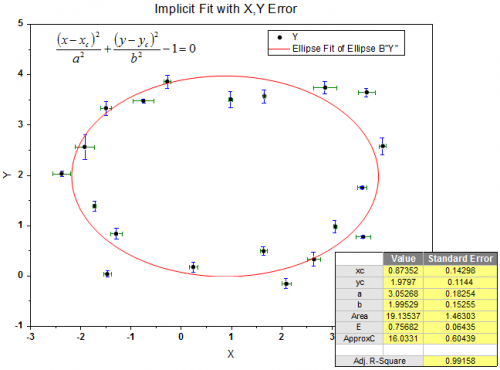
To fit your data with implicit fitting functions, you may use the built-in functions of nonlinear implicit curve fitting, or create your own implicit fitting functions.
Fit with the Implicit Functions
To fit with an implicit function,
- Select from top menu Analysis:Fitting:Nonlinear Implicit Curve Fit to open the dialog.
- Select a function under the Implicit category.
| Notes: Implicit fit functions use Orthogonal Distance Regression. |

|
Mini Tutorial:Fit for Ellipse
|
Implicit Fit with More Than Two Variables
Please note the following when you carry out implicit fit with more than 2 independent variables:
- It is required to have worksheet data as the input data, i.e. you cannot carry out the fitting from a data plot in this case.
- Only the data type Fitted Point for Input Data is supported for all variables. To modify this setting in the NLFit dialog, go to the Settings taband select Fitted Curves. Expand the Fitted Curves Plot branch set Data Type of variable to be Fitted Point for Input Data.
- It is not supported to generate a fitted curve automatically, however you could get the data for fitted curve in the report sheet.
Create a User-Defined Implicit Function for Fitting
To create your own implicit fitting function, you need to first open the Fitting Function Builder either by:
- Select Analysis:Fitting:Nonlinear Implicit Curve Fit to open the NLFit dialog.
- Select <New...> in the drop-down menu of Function.
or
Choose Tools:Fitting Function Builder or press F8.
When the Fitting Function Builder is open,
- Choose the Create a New Function radio button and click Next.
- Choose the Implicit radio button for Function Model.
or
- Select Tools:Fitting Function Organizer or press F9 to open the Fitting Function Organizer
- Create a new function under the Implicit category.
Note that you can only do implicit fitting with functions in the Implicit category, so you need to move any created implicit functions to the Implicit category in Fitting Function Organizer.
Refer to the Origin help file for how to define a user-defined fitting function.
|
|
This is a short tutorial showing how to create a user-defined implicit fitting function and fit data with it.
|
| Note: Fitting with any User Defined function requires parameter initialization. A value of 1 for each parameter should be sufficient for a Hyperbolic function. |