15.3.7.2 Fitting 3D Surfaces (Pro Only)
 See more related video:Multi-Peak Surface Fitting
Origin supports 3D Surface Fitting, which is an extension of ordinary nonlinear fitting, for both XYZ and matrix data. The operation to perform a surface fit is similar to that of nonlinear fitting.
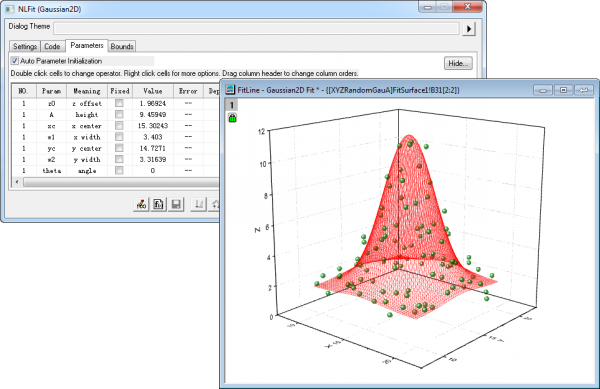
Origin provides 22 built-in surface fitting functions, such as Gauss2D, DoseReponse2D, Exponential2D, and Polynomial2D, or you can define your own function.
Start a surface fitting session
- Fit from a worksheet. You should specify XYZ range as input data, and then select Analysis: Fitting: Nonlinear Surface Fit to open the dialog.
- Fit from a matrix. To open the dialog, select Analysis: Nonlinear Matrix Fit from menu when a matrix is active.
- Fit from a 3D graph. You can fit the surface by selecting Analysis: Fitting: Nonlinear Surface Fit to open the dialog.
Since there are two independent variables in surface fitting, a scatter plot cannot be used to represent the residual in a plane and a contour plot should be used instead. Please read the Residual Analysis chapter for more information.
Add Fitted Surface Plot
The surface fitting results can be plotted either as a 3D surface or 2D contour. If it is a 3D surface, it will be plotted based on OpenGL by default. You can click here to learn the method of controlling the OpenGL status.
You can choose to add the fitted surface plot to source graph if you start the surface fit from a graph, this table below shows the difference between turning on and off OpenGL when adding fitted surface to source graph:
| OpenGL is on | OpenGL is off | |
|---|---|---|
| Data Format of Source Graph | XYZ range, virtual matrix, matrix | XYZ range |
| Data Format of the Fitted Curve Plot Results |
|
Virtual matrix |
| Support fitted curve plot type | Two types:
|
Five types:
|
| Support X Data Type of fitted curve |
|
|
| Notes: It is always supported to plot the surface fitting results as either 3D surface or 2D contour, and include the fitted surface plot in the report sheet. |