 See more related video:Find X/Y Values after Fitting
See more related video:Find X/Y Values after Fitting
The Find X/Y table allows you to obtain either a dependent variable value given an independent variable value, or an independent variable value given a dependent variable value, from the fit you performed on the data.
After fitting, there will a new worksheet named something like *FindXfromY* (or *FindYfromX*). Enter the Y (or X) values into the first column in the new sheet and the X (or Y) values will be calculated automatically.
Control over output options varies by fitting tool. In the Linear Fit tool, for instance, a check box turns on FindX/Y output and a second check box allows calculation of 95% LCL and UCL values at FindX/Y values. In the Nonlinear curve fit tool (NLFit), you can specify extra X/Y columns using a drop-down list. If there are multiple solutions, those values will be added in the extra columns. For example, in the model, there might be two x values for a given y value. So you might specify the Number of X Columns as 2 in the Find X from Y branch.
Generally, Find Y from X runs faster than Find X from Y. When finding Y from X, Origin uses the fit parameter values directly in the fitting model, to calculate the Y values. However, if you choose to find X from Y, Origin will not be able to derive an X~Y equation automatically. It has to calculate the approximate values by iteration. The algorithm used is illustrated below:
Origin first creates a uniform linear curve. For a given Y value, the range containing the Y value is found. For example, the Y value of a given point might fall into the range [yn, yn+1]. We know the X value should be within the range [xn, xn+1]. Then a new Y value y', which corresponds to X = (xn + xn+1) / 2, is computed. With the computed y', we can divide the range [yn, yn+1] into two subranges [yn, y'] and [y', yn+1]. Then y and y' are compared to see in which subrange y is located. These steps are repeated until the difference between y and y' is within some tolerance  .
.
Note that the iteration method is used in Find X from Y. You can only find the X values for Y values within the source data range.
When finding X from Y or Y from X, you can opt to calculate the 95% confidence interval.
 , the resulting X is
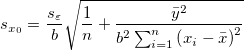
  . is within the range of measurement, by interpolation, the standard deviation
  in is given by

 is the fitted slope,
  is number of points,
  is the sample variance, and
  and
and  are the mean values of the X and Y data respectively. is out of the range of measurement, by extrapolation, the standard deviation in is given by
 confidence interval is calculated as:
![[x_0 - t_{(\frac{\alpha}{2},n-2)}s_{x_0}, x_0 + t_{(\frac{\alpha}{2},n-2)}s_{x_0}]](/origin-help/en/images/Finding_Y_X_from_X_Y_Standard_Curves/math-8a707c459e02cab0f9b9c0d13e2f608d.png?v=0 "[x_0 - t_{(\frac{\alpha}{2},n-2)}s_{x_0}, x_0 + t_{(\frac{\alpha}{2},n-2)}s_{x_0}]")
 is the critical t value for
  (one tail) and n-2 degrees of freedom.