15.3.8 Fit Comparison
OriginPro's fit comparison tools make it easy for you to compare models or compare data:
Comparing Models to One Dataset
OriginPro provides two tools to help user find the best model for his data.
- Rank Models
- Compare Models
Please look at the comparison of these two tools as below
| Rank Models | Compare Models |
|---|---|
| Support MULTIPLE models | Support only TWO models |
| Fit and compare models in the same tool | Require fitting report first |
| Compare functions in one category | Can compare functions in different category, or between different tools |
| Only support default fitting options | Support customized fitting options such as fix parameter, concatenate fit ect |
| Support user-defined model | Support user-defined model |
Fit and rank multiple functions in a category
The Rank Models tool in OriginPro can fit and rank multiple functions to a dataset. The fit results can be ranked by either Akaike (AIC) or Bayesian Information Criterion (BIC), to determine the best fitting model for your data.
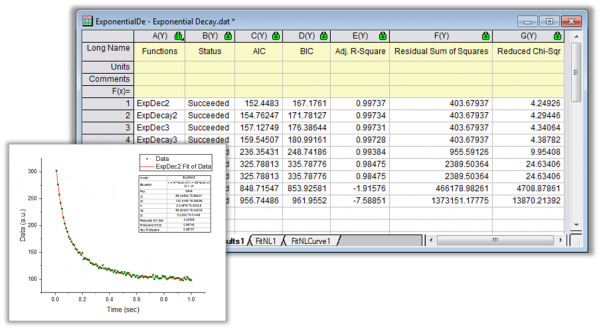
To perform the Rank Models operation
- Choose Analysis: Fitting: Rank Models from Origin menu
or
- Type funcrank -d in the Script Window
Compare two fitting models to one dataset
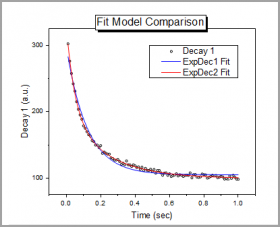
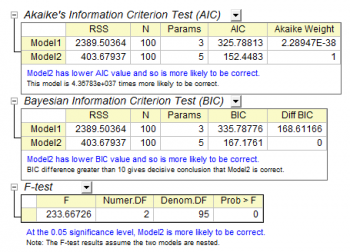
The Compare Models tool helps to user to decide which model works better with your data
|
|
To perform the Compare Model operation
- Perform fitting twice using two different fitting functions for the same fitting data, and create two fitting reports.
- Select Analysis: Fitting: Compare Models from Origin menu.
Comparing two datasets with one fitting model
If you want to evaluate which data better fits a particular model, you can use Compare Datasets tool:
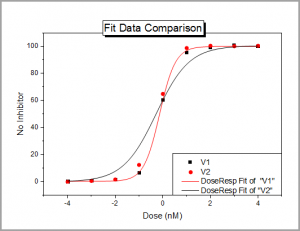
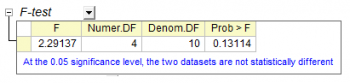
To perform the Compare Model operation
- Perform fitting on two different datasets, using the same fitting function, and create two fitting reports.
- Select Analysis: Fitting: Compare Datasets from Origin menu.
| Topics covered in this section: |