- Menu Command: Analysis: Signal Processing: FFT Filters
- Window Types: Workbook, Graph
- X-Function Script and GUI Examples: fft_filters
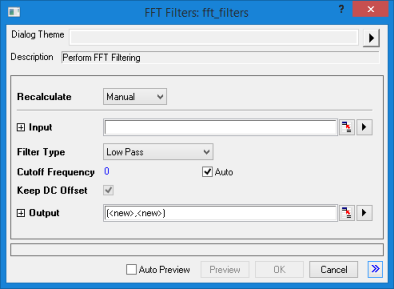
| Dialog Theme | See Dialog Themes. |
|---|
| Recalculate | |
|---|---|
| Input |
Specifies the input signal. See Specifying Your Input Data. |
| Filter Type |
Specifies the filter type.
|
| Lower Cutoff Frequency |
This option is available only when Filter Type is either Band Pass or Band Block. |
| Upper Cutoff Frequency |
This option is available only when Filter Type is either Band Pass or Band Block. |
| Cutoff Frequency |
This option is available only when Filter Type is either Low Pass or High Pass. |
| Threshold |
Amplitude threshold. This option is available only when Filter Type is Threshold. |
| Pass Frequency |
This option is available only when Filter Type is Low Pass Parabolic. All frequencies below this value will be kept unchanged after being filtered. |
| Stop Frequency |
This option is available only when Filter Type is Low Pass Parabolic. All frequencies above this value will be removed completely. |
| Keep DC Offset |
This option is available only when Filter Type is High Pass, Band Pass or Band Block. If this check box is selected, the DC offset will remain unchanged during the filtering. |
| Output |
Specifies the output. See Output Results. |