31.6.3 Double-Y Column Line+Symbol Graph
Data Requirements
Select at least one Y column (or a range from at least one Y column). Ideally, select two Y columns (or a range of two Y columns). If there is an associated X column, X column supplies X values; otherwise, sampling interval of the Y column or row number is used.
Multiple Y columns will be sepereated into 2 groups by 2 X columns; otherwise, these Y columns will be assigned to different Y axis by sequence.
Creating the Graph
Select required data.
Select from the main menu.
Template
DblY_ColSymb.OTP (installed in the Origin program folder).
Notes
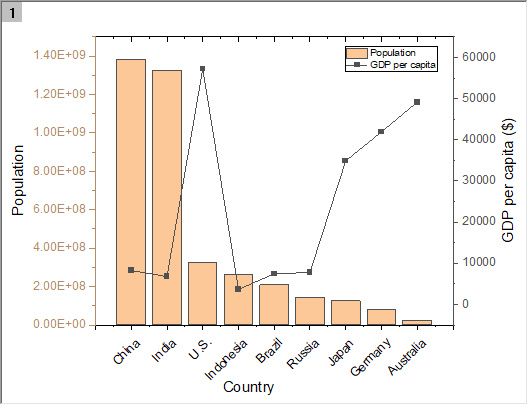
This graph type has one layer only and 2 Y axes with different axis scale, same as the double Y axis Graph. In this graph, the Y column(s) based on left Y axis will be plotted as column and the Y column(s) based on right Y axis will be plotted as line+symbol.
- This is a single-layer graph template with two independent vertical (Y) axes.
- The Axis dialog Show tab Rescale Each Axis Independently box is checked.
- The template has the same data requirements and produces the same graph as the two-layer 2Ys Column-Line Symbol.