4.3.4 Column Short Name Restriction
Since version 2017, the Origin workbook has supported a simplified Spreadsheet Cell Notation (SCN), similar to that used in MS Excel. For users of older versions of Origin, there are a few things to know:
- The purpose of SCN is to allow for creation of column formulas with a simpler, easier-to-read syntax.
- SCN is turned ON in all new books, by default.
- When SCN is turned ON, column Short Names are not editable and cannot be reordered, contrary to what users may remember from older versions of the software.
- When SCN is enabled (default), column Short Names are ordered alphabetically according to column index as follows:
- A, B, …, Z, AA, BB, …, ZZ, .etc
If you insert or move columns within the worksheet, you will see that column Short Names are reassigned alphabetically.
When writing column formulas with the new syntax:
- A can be used to refer to column with Short Name "A", replacing the old col(A) syntax.
- A1 can be used to refer to the first cell in column A, equal to the old syntax col(A)[1].
- [Book2]Sheet1!A can be used to refer to the first column of Book2, Sheet1, even though it is not the current worksheet. This is supported only when Spreadsheet Cell Notation is turned on.
- A:A can be used to refer to column with Short Name "A", same as A (old col(A) syntax).
- $ added before any column Short Name or row index means fixing this column or row when auto-filling cell formula or column formula.
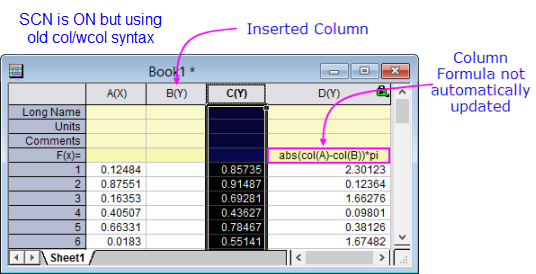
Note that the "old" col/wcol syntax is still usable, though some of the advantages afforded by the new syntax are not supported. For instance, if you insert a worksheet column ahead of a column of values derived from an F(x)= or Set Values formula that uses the old syntax, the column formula is not automatically updated to reflect the new column arrangement.
|
Note: When referring to a column by its Short Name in the column formula:
|

|
Example 1
A-abs(B) to calculate column A minus the absolute values of column B. Example 2
B+A2
to calculate column B plus the second cell in column A. Example 3
[Book2]Sheet1!A+[Book2]Sheet1!B to set values by data in another workbook, [Book2]Sheet1. |
To reiterate, when Spreadsheet Cell Notation (SCN) is turned on, the column Short Name cannot be edited.
- To enable editing for GUI operations, uncheck the Spreadsheet Cell Notation checkbox in the Properties tab of the Window Properties dialog.
- Also, see FAQ-849: Can I turn off or selectively control use of spreadsheet cell notation in my workbooks?
- To enable column renaming in your scripts, see this FAQ.
|
Note: Workbooks and Projects that use the simplified notation do not work in pre-2017 versions of Origin. |
For more on column naming as it relates to worksheet calculations in Origin, see these topics: