26.5 Code Builder
Code Builder is the Origin C integrated development environment. It provides standard tools for writing, compiling, and debugging Origin C programs and LabTalk scripts. To open Code Builder, click the View: Code Builder menu item or click the  button on the Standard toolbar or press Alt+4.
Everything you need to develop your Origin C programs or LabTalk scripts is in this window:
button on the Standard toolbar or press Alt+4.
Everything you need to develop your Origin C programs or LabTalk scripts is in this window:
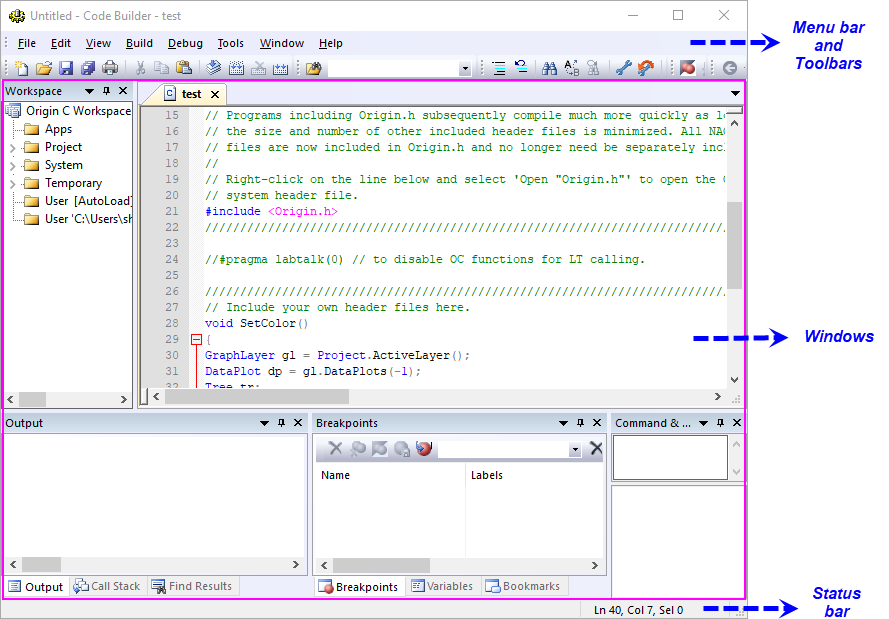
- Menu bar and Toolbars:
- The upper panel is the interface where Code Builder provides all its commands and options.
- For further information please refer to Menu Items Toolbars and Status Bar.
- Windows:
- The middle panel is the main working space where you can organize and develop your Origin C programs as well as debug your LabTalk scripts.
- For further information please refer to Workspace text editor and other windows.
- For debugging LabTalk scripts please refer to Debug LabTalk Scripts.
- Status bar:
- The lower panel contains information of your Code Builder such as position information of the cursor.
- For further information please refer to Menu Items, Toolbars and Status Bar.