31.5.5 Bar Of Pie Chart
Data Requirements
Select exactly one Y column of values (or a range from one column).
Creating the Graph
Select required data.
From the menu, choose .
Template
BarofPie.OTP (installed to the Origin program folder).
Notes
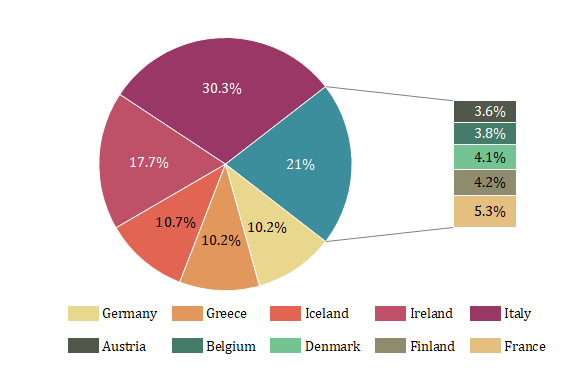
A bar of pie plot is also a variation of 2D pie chart just like the pie of pie chart, which has one pie chart and one bar chart connected by two straight lines:
- The pie chart is the main chart, locates at the left of layer, shows whole component distribution in percentages including the wedge "Other" which is the sum of combined wedges.
- The bar chart is the child chart, locates at the right of layer, shows the detailed information of the combined wedges of the wedge "Other".

|
If you have a 2D pie chart, want to plot a bar of pie chart:
|
Reference
To customize the viewing angle, rotation,radius and center, see The (Plot Details) Pie Geometry tab.
To customize the wedges, such as exploding and combining the wedges, see The (Plot Details) Wedges Tab.
To customize the labels of wedges, see The (Plot Details) Labels tab.