2.1.9 App Center
Contents
Overview
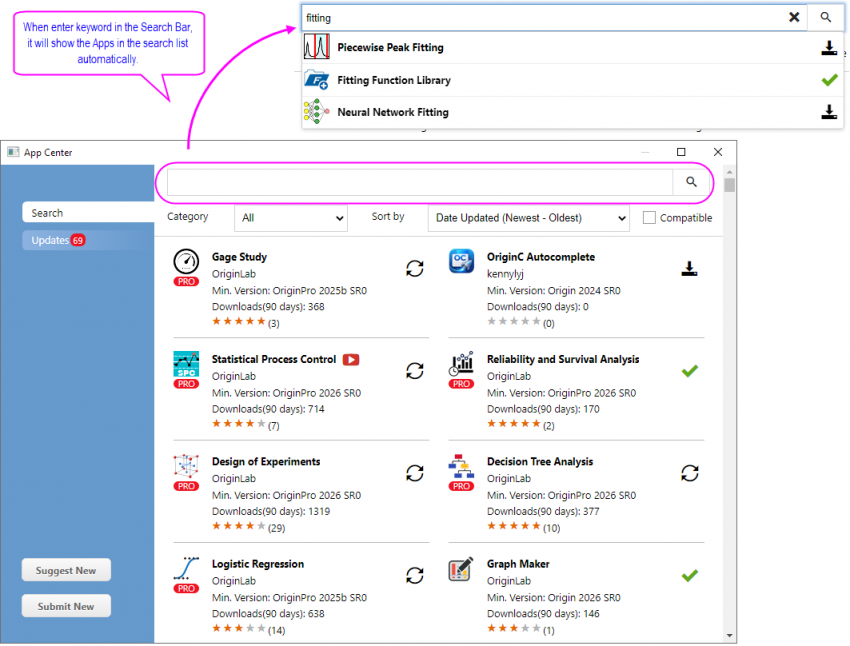
The App Center dialog helps you get start with Origin Apps. You can also manage your Apps in this dialog, installing new Apps and keeping the installed Apps up to date. When enter keyword in the Search Bar of this dialog, it will show the Apps in the search list automatically.
Note: for more information about Origin Apps, please see this page
To open App Center
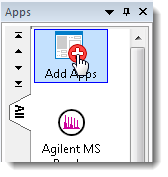
- Click on the Add Apps icon in Apps gallery
 | Registration is needed to use App Center. If you haven't registered your Origin, follow the prompt to complete registration. |
Usage
Search tab: overview of Apps and find the required Apps
On this tab, you can:
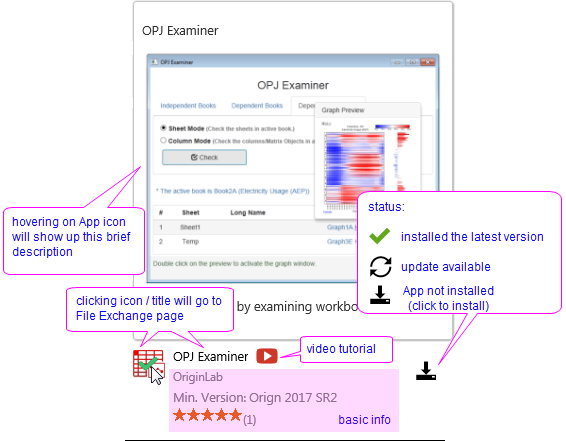
- see the basic information, including the developer and the minimum required version.
- see the introduction
- when the mouse hovers over the App icon, a brief description will pop up.
- clicking the App icon or title can open the file exchange page to see detail description
- for some Apps, a short video tutorial is provided, which can be launched by clicking the
 button.
- check the status of the Apps, and then choose to install or update the App.
- sort the app list by date update, download frequency, ratings or minimum version.
- search Apps by keywords, category, and compatible versions.
Note: Min Version lists All and Compatible two options. Compatible means set min version to current Origin version, so you will only see the apps that can really install and used in your Origin. However, it won't filter out Pro version if you have a standard Origin.
| You can also search for relevant Apps from these Origin menus, by clicking on Find Apps...:
This opens the App Center where you can click the Download and Install icon |

Updates tab: manage and update existing Apps
Choose Updates tab from left to view all Apps available for updates. You can click  button to the right of an App to update it, or click Update All Compatible button to update all at once.
| You can set @AUA = 1 in the System Variables dialog to turn on auto-update for installed Apps that have an update available. |
Request a new App and submit your App
 - click to request a feature that you cannot accomplish by the existing Apps.
 - if you have developed an App, welcome to share it via File Exchange.