12.2 Origins Analysis Dialog Boxes
The interp1 X-Function dialog box is typical of Origin's analysis dialog boxes. Note that at the top of the dialog box, there is a list box used for naming or retrieving a Dialog Theme -- a particular group of dialog box settings. Directly beneath, is a brief Description of what the tool does.
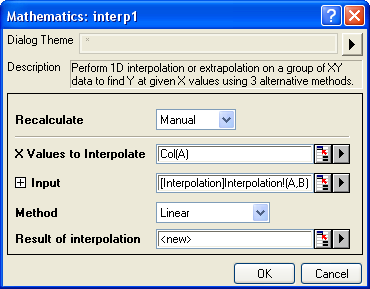
The center portion of the analysis dialog box lists the controls specific to a particular tool (though some of the same controls may appear in other dialog boxes). These controls are organized in a tree-like structure, with branching sections marked and controlled by a familiar  or
or  control.
- Click on the control to expand a branch and reveal subordinate controls.
- Click on the control to collapse a branch and shrink the dialog box.
To repeat the last action easily
- To repeat the last action, you can select menu Edit: Repeat Last Action or use hotkey Ctrl + Backspace.
- To reopen the last analysis dialog, you can select menu Edit: Reopen Last Analysis Dialog or use hotkey Ctrl + Shift + Backspace.
| Topics covered in this section: |