8.3.4.1 Adding one Layer using Insert New Layer menu
If you want to add one more layer into current graph window, you can select Insert: New Layer(Axes): ### menu to add a new layer with desired axes.
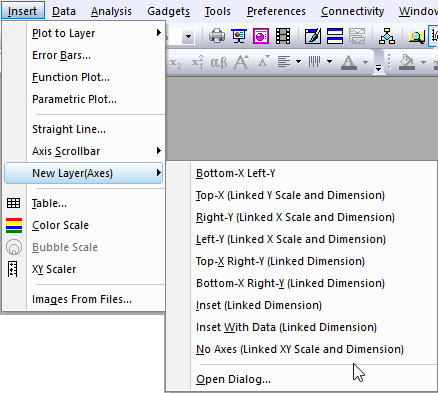
- Bottom-X Left-Y
- The new layer will have a bottom X axis and a left Y axis. This menu item is equal to the toolbar button
 .
.
- The new layer will have a bottom X axis and a left Y axis. This menu item is equal to the toolbar button
- Top-X (Linked Y Scale and Dimension)
- The new layer will have a top X axis, and its Y axis has been linked to the Y axis of active layer straightly(1 to 1), with the Unit been set to % of Linked Layer. This menu item is equal to the toolbar button
 .
.
- The new layer will have a top X axis, and its Y axis has been linked to the Y axis of active layer straightly(1 to 1), with the Unit been set to % of Linked Layer. This menu item is equal to the toolbar button
- Right-Y (Linked X Scale and Dimension)
- The new layer will have a right Y axis, and its X axis has been linked to the active layer straightly(1 to 1), with the Unit been set to % of Linked Layer. This menu item is equal to the toolbar button
 .
.
- The new layer will have a right Y axis, and its X axis has been linked to the active layer straightly(1 to 1), with the Unit been set to % of Linked Layer. This menu item is equal to the toolbar button
- Left-Y (Linked X Scale and Dimension)
- The new layer will have a left Y axis, and its X axis has been linked to the active layer straightly(1 to 1), with the Unit been set to % of Linked Layer.
- Top-X Right-Y (Linked Dimension)
- The new layer will have a top X axis and a right Y axis that are linked to the active layer, with the Unit been set to % of Linked Layer. This menu item is equal to the toolbar button
 .
.
- The new layer will have a top X axis and a right Y axis that are linked to the active layer, with the Unit been set to % of Linked Layer. This menu item is equal to the toolbar button
- Bottom-X Right-Y (Linked Dimension)
- The new layer will have a bottom X axis and a right Y axis that are linked to the active layer, with the Unit been set to % of Linked Layer.
- Inset (Linked Dimension)
- The new layer will be a linked inset for the active layer, with the Unit been set to % of Linked Layer. This menu item is equal to the toolbar button
 .
.
- The new layer will be a linked inset for the active layer, with the Unit been set to % of Linked Layer. This menu item is equal to the toolbar button
- Inset With Data (Linked Dimension)
- The new layer will be a linked inset for the active layer, and it will have the data plots from the active layer, with the Unit been set to % of Linked Layer. This menu item is equal to the toolbar button
 .
.
- The new layer will be a linked inset for the active layer, and it will have the data plots from the active layer, with the Unit been set to % of Linked Layer. This menu item is equal to the toolbar button
- No Axes (Linked XY Scale and Dimension)
- The new layer has no axis, but its XY scale is linked to active layer straightly(1 to 1), with the Unit been set to % of Linked Layer.
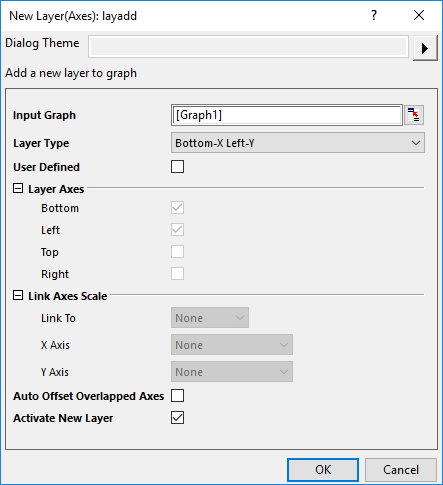
- Open Dialog...
- This will open the New Layer(Axes) dialog(layadd X-Function):

|
This tutorial will teach you how to add one more layer into current graph window by the X-Function layadd:
|
 | Once you have added a new layer into current graph, you can double-click on the new layer to open Plot Details dialog to check the linking status in the Link Axes Scales tab. |
| Origin provides Common Display controls for applying customizations made to a single graph layer, to selected layers in a multi-layer graph. By default, added layers are excluded from such group customizations. For more information, see Common Display. |