
Inserting special characters into a text string comes up in a variety of situations. Be sure to see:
FAQ-148 How Do I Insert Special Characters into Text Labels, Worksheet Cells and Dialog Boxes?.
| Inserting special characters into a text string comes up in a variety of situations. Be sure to see: |
Origin 2018 added Unicode support. There are multiple ways to add Unicode characters to your text labels:
 . This will either open the advanced symbol map or simple map, depending on your version (note that in the latest version, you can toggle between the two symbol map dialogs using the Advanced/Simple buttons at the bottom of these dialogs). If using the advanced dialog, select your Font, check the Unicode box and enter the 4-character hex code for the symbol in the Go to Unicode box. Verify that the symbol is correct and click Insert (e.g. Font = Arial and Go to Unicode = 03BB).
 | All of these methods assume that the chosen font set includes the character you are trying to insert. If the font does not include your character, Origin will not display the character. Instead, you will see a hollow rectangle ( |
These are older methods which pre-date Origin 2018 and Unicode support. Use these methods to add ANSI characters to your text labels. Note that whichever method is used, Origin will
Using "in-place" editing methods:
Alternately, you can insert characters directly, if you know the ANSI code (available from the Symbol Map or from standard tables):
If entering text in the Object Properties dialog:
 (note that the Greek button inserts escape sequences).
|
Note: Each font has a unique ANSI character set. To find codes for characters from any font sets, consult the Windows Character Map (under Accessories > System Tools in older operating systems or in your Apps list). |
Prior to Origin 2018, Origin did not support Unicode. Therefore, if you are using a newer version and intend to share data with users of older software, you'll need to pay attention to the following:
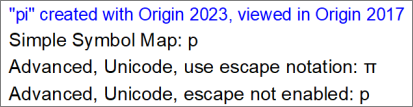
 | As of Origin 2023, Origin will no longer save the OPJ project files compatible with Origin 2017 and older versions. However, users can share individual window files (OGG, OGW, etc) with 2017 and earlier. |
