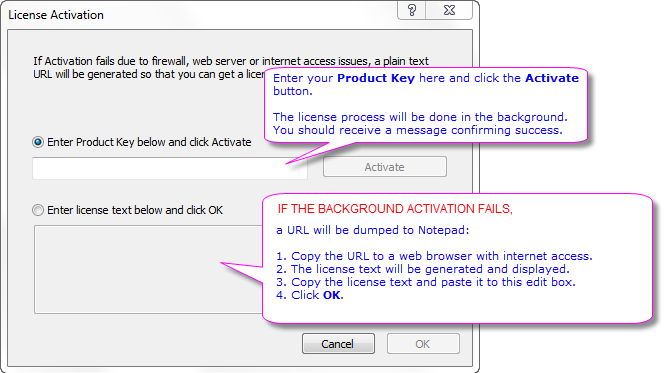
In order to activate Origin, you need a Product Key.
This License Activation dialog will open every time you start Origin, until you enter a Product Key and complete the licensing process. The dialog can also be manually opened from the Help: Activate License menu item.
NOTE: The background license process will work in most cases. If it fails due to firewall, web server or other internet access issue, use the second edit box to enter the license text manually.
The Product Key is tied to your serial number. It will be sent to the OriginLab server to generate a license for your computer.
| If your Serial Number is | Then... |
|---|---|
|
xFxxx-9xxx-70xxxxx |
See this page for step-by-step instruction to get your Product Key. |
|
xFxxx-9xxx-76xxxxx |
Contact your Administrator for Product Key |
|
xAxxx-6089-72xxxxx |
See this page for step-by-step instruction to get your Product Key. |
|
xMxxx-6xxx-7xxxxx |
See this page for step-by-step instruction to renew your dongle. |