2.2 Sending Data to Save into OGW
In this tutorial, you will continue from Creating a Simple VI to Save Data to Origin to save the workbook as an OGW file.
- Perform operations in Creating a Simple VI to Save Data to Origin.
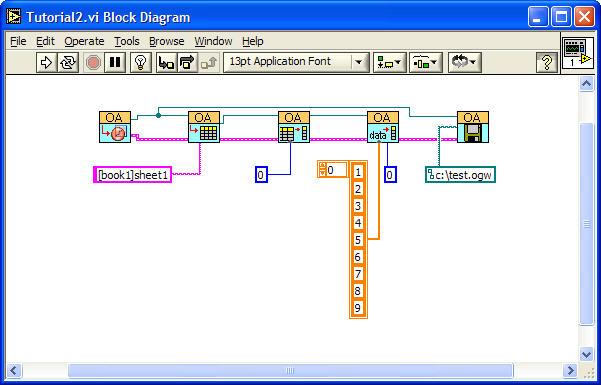
- Add an OA_Save VI
 from the Origin VI palette, and wire the Origin.IOApplication connector to the corresponding connector of OA_ConnectToOrigin VI and the Error IO connector to the corresponding connector of OA_Col-SetData VI.
 - Add a path constant and set the path as c:\test.ogw, and wire it to the Path connector of OA_Save VI.
- When the wiring is complete, your Block Diagram window should look like this:
- Click the Run button to send the data to Origin. You should see the data in the [Book1]Sheet1 worksheet and find that a file named test.ogw appears under c:\.