2.1.47 Save
Contents
Description
Save the current Origin session to an Origin project (OPJ) file.
Syntax
VB: Function Save([ Path As ByVal Object ] ) As Boolean
C++: bool Save(_variant_t Path )
C#: bool Save(var Path )
Parameters
- path
- The full path and name of the Origin project file.
Return
Returns true if successful else false.
Remark
Examples
VBA
Private Sub MySampleProject()
    Dim originApp As Origin.ApplicationSI
    Dim projectName As String
    Dim path As String

    ' Connect to Origin
    Set originApp = New Origin.ApplicationSI

    ' Init the project file name
    projectName = "2D Bin and Fit.opj"

    ' Load the project from the installation folder
    path = originApp.path(APPPATH_PROGRAM) + "Samples\Curve Fitting\" + projectName
    originApp.Load (path)

    ' Save the project to the User Files Folder
    path = originApp.path(APPPATH_USER) + projectName
    originApp.Save (path)
End Sub
C#
using Origin;
static void LoadAndSaveExample()
{
	// Connect to Origin.
	Origin.ApplicationSI originApp = new Origin.ApplicationSI();

	// The file name of a sample Origin project.
	string strFileName = "2D Bin and Fit.opj";

	// Create the full path of the file for loading and ask Origin to load the project.
	string strFullFileName = originApp.Path(APPPATH_TYPES.APPPATH_PROGRAM) + "Samples\\Curve Fitting\\" + strFileName;
	originApp.Load(strFullFileName, System.Type.Missing);

	// Create the full path of the file for saving and ask Origin to save the project.
	strFullFileName = originApp.Path(APPPATH_TYPES.APPPATH_USER) + strFileName;
	originApp.Save(strFullFileName);
}
Python
import OriginExt as O
import tempfile
app = O.Application(); app.Visible = app.MAINWND_SHOW
pageName = app.CreatePage(app.OPT_WORKSHEET)
testData = [[5,87,90], [3.14, 24.6, 68.09]]
app.PutWorksheet(pageName, testData)
# Save the project
tempDir = tempfile.mkdtemp()
tempFile = tempDir + "\\OriginExtTest.opju"
app.Save(tempFile)
app.NewProject()
app.Load(tempFile)
LabVIEW
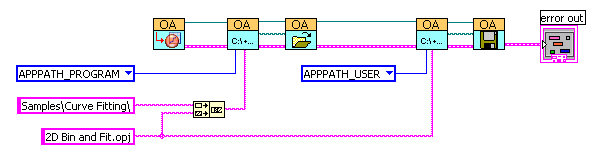
Version Information
8.0SR2