5.2 Setting and Removing Breakpoints
To locate logic errors in your program, you can step through your code by pausing execution at breakpoints and checking the values of variables.
To Set a Breakpoint:
- Click in the line of code and do one of the following:
- Press F9.
- Select Debug:Toggle Breakpoint.
- Click the Toggle Breakpoint button
 on the Debug toolbar.
or
- Right-click in the line of code and select Toggle Breakpoint from the shortcut menu.
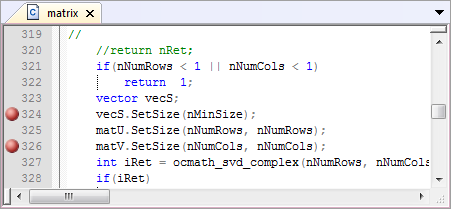
You can set breakpoints in both debugging and non-debugging mode. After setting a breakpoint, a red circle displays in the left margin next to the line of code.
Note: The Enable Breakpoints button  on the Debug toolbar and the Debug:Enable Breakpoints menu command turn debug mode on or off. For more information, see Starting the Debugger. on the Debug toolbar and the Debug:Enable Breakpoints menu command turn debug mode on or off. For more information, see Starting the Debugger.
|
To Remove a Breakpoint:
- Click in the line of code and do one of the followings:
- Press F9.
- Select Debug:Toggle Breakpoint.
- Click the Toggle Breakpoint button on the Debug toolbar.
or
- Right-click in the line of code and select Toggle Breakpoint from the shortcut menu.
You can remove breakpoints in both debug and non-debug mode.
To Remove all Breakpoints:
- Select Debug:Clear All Breakpoints
- Click the Clear All Breakpoints button
 on the Debug toolbar.