1 Code Builder Interface
Code Builder is Origin's Origin C and Python integrated development environment. It provides standard tools for writing, compiling, and debugging Origin C, Python and LabTalk code.
To open Code Builder, click the View: Code Builder menu item or click the  button on the Standard toolbar or press Alt+4.
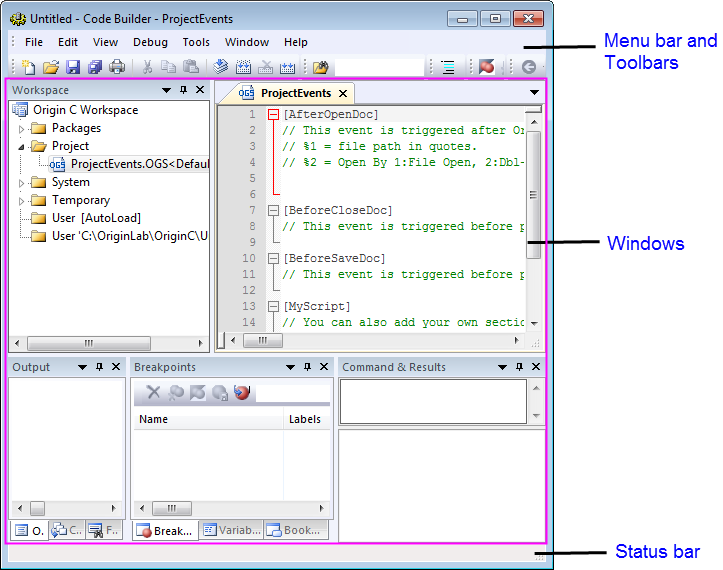
Everything you need to develop your programs and scripts is in this window:
button on the Standard toolbar or press Alt+4.
Everything you need to develop your programs and scripts is in this window:
To quickly get started with the use of Code Builder, please refer to Code Builder Quick Start to Run an Origin C File. Python developers can refer to Origin's Embedded Python documentation and New originpro package for easy access to Python.
- Menu bar and Toolbars:
- The upper panel is the interface where Code Builder provides all its commands and options.
- For further information please refer to Menu Items Toolbars and Status Bar.
- Windows:
- The middle panel is the main working space where you can organize and develop your Origin C programs, Python programs and your LabTalk scripts.
- For further information please refer to Workspace text editor and other windows.
- For debugging LabTalk scripts please refer to Debugging LabTalk Scripts.
- Status bar:
- The lower panel contains information of your Code Builder such as position information of the cursor.
- For further information please refer to Menu Items, Toolbars and Status Bar.
| This section covers the following topics: |