2.42.1.2 Tutorial of Power and Sample Size in DOE
 
|
 
|
Summary
Before running an experiment, it is important to know whether your design has enough data to detect the effects you care about. Power analysis helps answer this question: given factors, effect size, and variability, how many replicates do you need to achieve a desired statistical power?
This tutorial shows how to perform a power and sample size calculation for a 2-level factorial design using the Design of Experiments app. You will set up a full factorial design with three factors and two blocks, then determine the number of replicates required to reach a power of approximately 0.93 for an effect size of 0.4 with a standard deviation of 0.2.
Steps
- Click the Design of Experiments icon
 in the Apps Gallery
 - Click the Power and Sample Size button

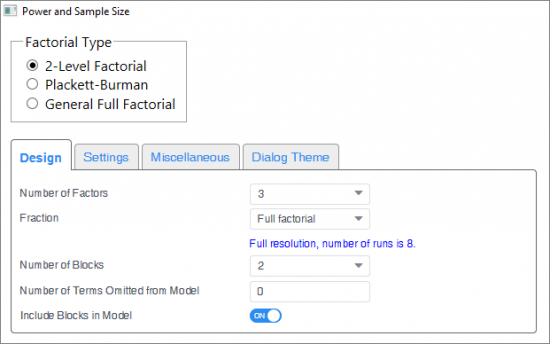
- Select 2-Level Factorial. In the Design tab, select 3 from Number of Factors drop-down list. Choose Full factorial from Fraction drop-down list. Select 2 for Number of Blocks. Enter 0 in Number of Terms Omitted from Model. Turn in Include Blocks in Model button.
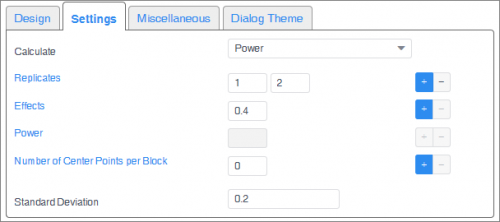
- In the Settings tab, choose Power to calculate. Click plus button to add 1 level to Replicates and enter 1 and 2 in each level. Enter 0.4 in Effects. Enter 0 in Number of Center Points per Block. Enter 0.2 in Standard Deviation. Click OK.
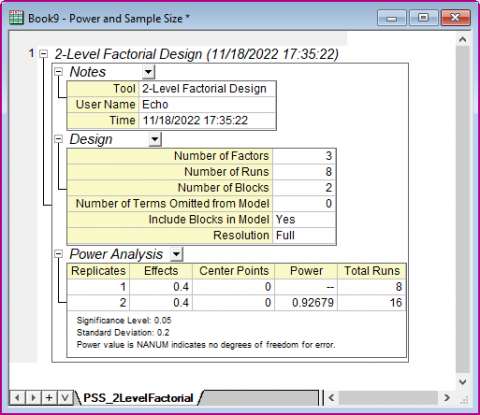
- The results in the report indicates that you should have 2 replicates in order to get a power value of 0.92679.