Hinweis:Dieser Abschnitt ist nur in englischer Sprache verfügbar. Wir bitten um Ihr Verständnis.
2.2.3.2 Lag Tool
Summary
The Lag tool is supported in the Time Series Analysis App. It is used to calculate lag or lead of a time series. This tutorial uses App's built-in sample project. To open this sample OPJU file:
- Right click the Time Series Analysis App icon
 in the Apps Gallery and choose Show Samples Folder.
- A folder will open. Drag-and-drop the project file TSA Sample.opju into Origin.
Lag
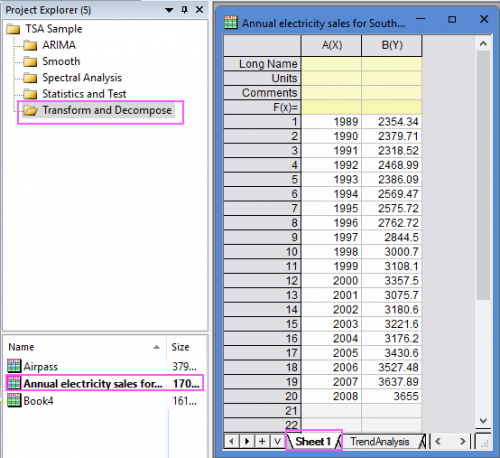
- Expand Project Explorer docked on the left. Select folder Transform and Decompose and go to sheet "Sheet1" in workbook "Annual electricity sales for South Australia from 1989 to 2008 - Copy".
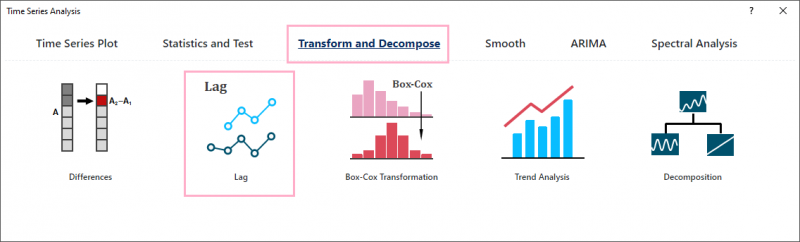
- Click the Time Series Analysis App icon in the Apps Gallery. Click the button Lag under the Tranform and Decompose tab to open the app dialog.
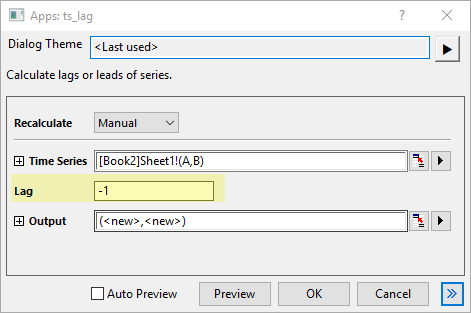
- Select the col(B) as Time Series; Enter -1 for Lag.
- Click OK button to perfrom the analysis.
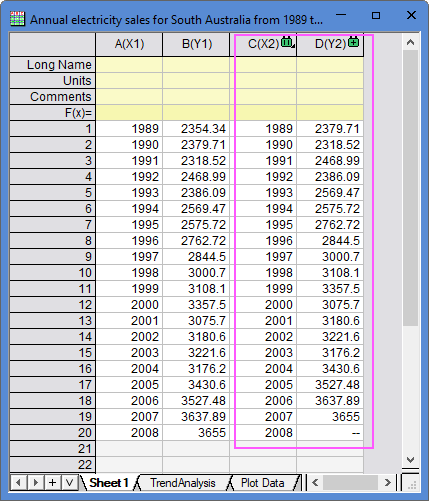
- The results are gotten by moving col(B) forward one row but keeping the original col(A).
Algorithm
Lag tool can shift a time series down by a number of rows.
Given a time series xi, i = 1, 2, ..., n, when lag k > 0, the first k elements in the result will be missing values, and the time series will be shifted down by k units. If k < 0, the last |k| elements in the result will be missing values, and the time series will be back shifted by |k| units.