1.2 LaTeX
Summary
The LaTeX app can be used to insert LaTeX objects in worksheet cells, graph axes titles, legends and text labels.
We have the online meterials below to help you to learn how to use this app for different cases. In this tutorial, we only illustrate this case: insert the formula of Gaussian function.
 
|
 
|
 | If your version is Origin 2023 or higher versions, MikTex and OAutotrace will be installed automatically when you install the app. If your version is lower than Origin 2023, you must have the following installed on your computer before you can use this App:
Note: During MikTex installation, choose All Users (default) instead of This User Only.
After installing the aforementioned components:
|
Tutorial
- Download the sample project fisrtly. Unzip the file and open the project file "LaTeX v2_3 Blog.opj".
- Open the project, we are going to add the formula of Gaussian function as below:

- With the graph window activated, choose Insert: LaTeX Equation... to open LaTeX Equation Editor.

- Enter the markup below into the top panel, and click Preview button to preview the equation:
y=y0+\frac{A\mathrm{e}^\frac{-4\ln\left(2\right)\left(x-x_c\right)^2}{w^2}}{w\sqrt{\frac{\pi}{4\ln\left(2\right)}}}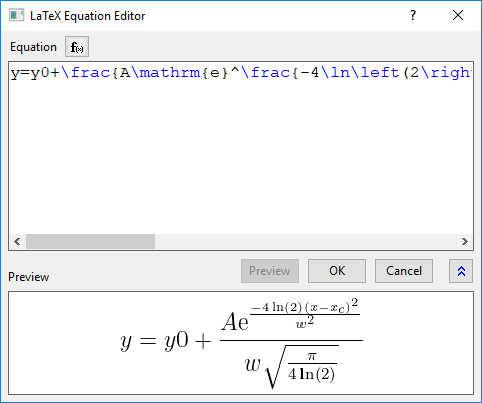
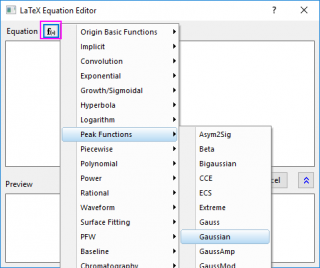
Note: If you want to insert a built-in function or user-defined function stored in Origin, you can click the button  to expand the funtion categories and select the function. The equation will be loaded into the top panel, you can click OK button to preview and insert it into the graph.
- Click OK button to insert this equation into the graph. You are also allowed to resize, move and rotate the LaTeX objects. If you want to modify the equation, you can double-click on the inserted equation to re-open the editor.
As LaTeX doesn't support molecular formula, if you want to add a skeletal structure diagram of a molecule, you need to use the Insert: Image from File tool instead.