3.7 Import NMR Data
Summary
Import NMR Data app is used to import NMR data in different formats, including FID data and processed data.
Tutorial
Please download sample data file from here. Unzip the unloaded file to your local disk.
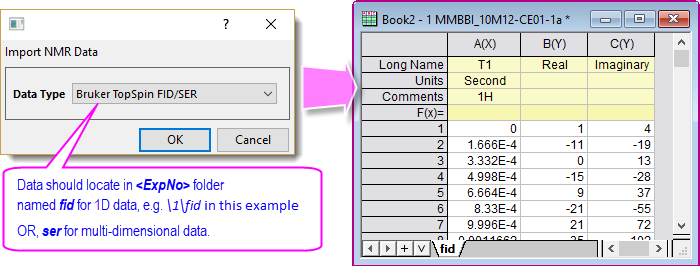
Bruker TopSpin FID/SER
- In a new project, click the Import NMR Data icon
 in the Apps Gallery to open the Import NMR Data dialog.
- Select Bruker TopSpin FID/SER for Data Type. Click OK.
- Browse to the folder to which you just unzipped the sample data file, and pick data \NMR_Sample_Data\bruker\MMBBI_10M12-CE01-1a\1\fid.
Bruker TopSpin Processed Data
- Click the Import NMR Data icon again.
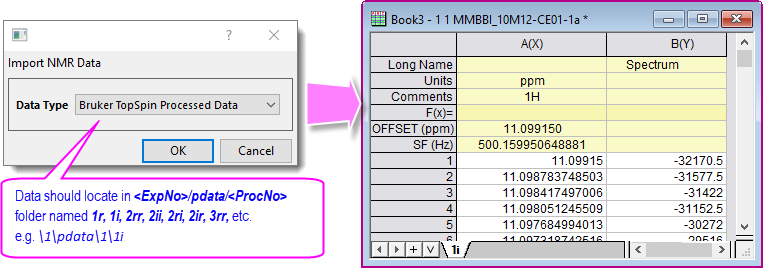
- In the Import NMR Data dialog, select Bruker TopSpin Processed Data for Data Type. Click OK.
- Browse to the unzipped sample folder, and pick data NMR_Sample_Data\bruker\MMBBI_10M12-CE01-1a\1\pdata\1\1i.
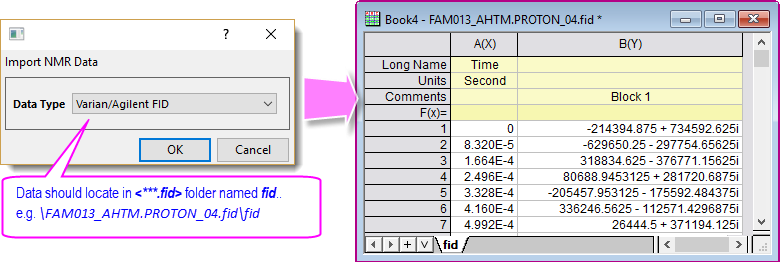
Variant/Agilent FID
- Click the Import NMR Data icon again.
- This time, select Varian/Agilend FID for Data Type in the Import NMR Data dialog. Click OK.
- Browse to the unzipped sample folder, and pick data NMR_Sample_Data\varian\FAM013_AHTM.PROTON_04.fid\fid.