1.15 Forest Plot
Contents
Summary
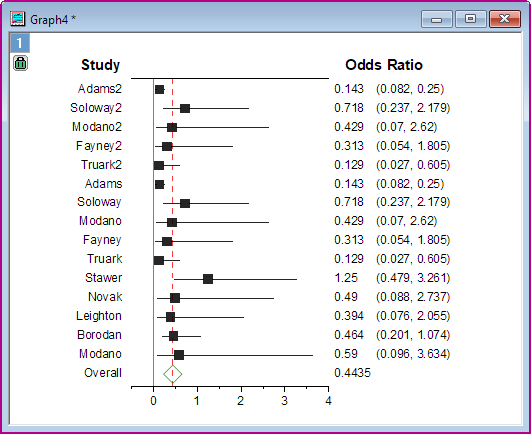
The Forest Plot app is used to create Forest Plot with optional weight for each study.
Tutorial
- Download this Forest_Plot_Sample.zip file. Open the Forest_Plot_Sample.opju in this zip file. Active Book1.
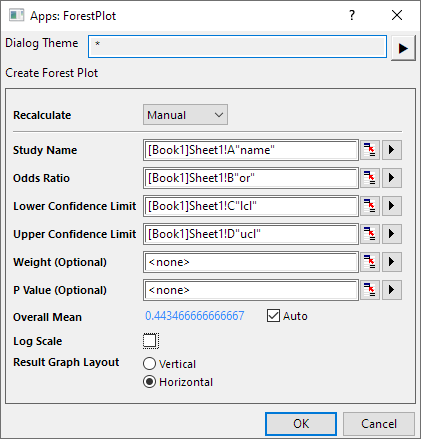
- Select the Forest Plot icon
 in the Apps Gallery window to open the dialog.
- Set Col(A) to Study Name, Col(B) to Odd Ratio, Col(c) to Lower Confidence, Col(D) to Upper Confidence and Col(E) to Weight(Optional). Uncheck Log Scale.
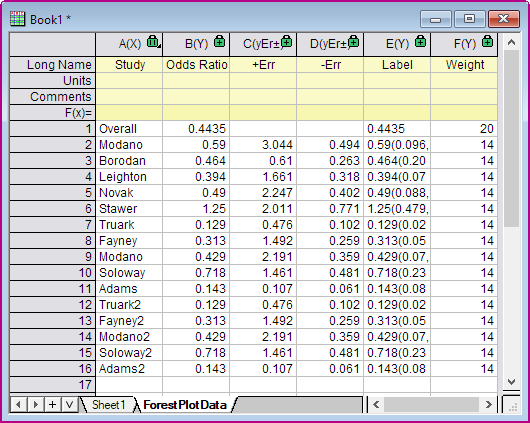
- Click OK. The Forest Plot and ForestPlotData sheet will be created.
- Click the green lock icon on the graph to reopen the dialog, then you can update the options setting.