Hinweis:Dieser Abschnitt ist nur in englischer Sprache verfügbar. Wir bitten um Ihr Verständnis.
2.73 Effect Size for ANOVA(Pro)
Summary
This Effect Size for ANOVA app can be used to calculate effect size from ANOVA analysis report.
Tutorial
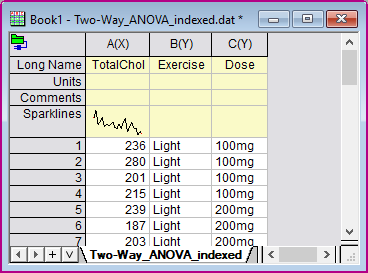
- With a new worksheet active, select menu Data: Connector to File: Text/CSV. Browse to built-in sample data folder and choose file: \\Samples\Statistics\ANOVA\Two-Way_ANOVA_indexed.dat.dat. Import with default settings.
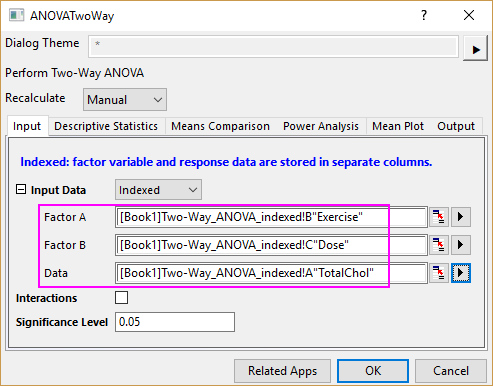
- Select menu Statistics: ANOVA: Two-Way ANOVA. Choose column B as Factor A, column C as Factor B and column A as Data. Click OK button. A report sheet ANOVA2Way1 is created.
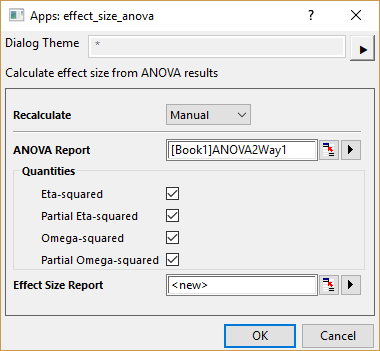
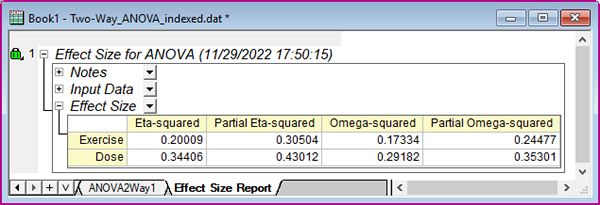
- With report sheet ANOVA2Way1 active, click Effect Size for ANOVA App icon in the Apps Gallery window. In the opened dialog, 4 quantities are available: Eta-squared, Partial Eta-squared, Omega-squared, and Partial Omega-squared. Check all of them. Click OK.