2.73 Effect Size for ANOVA(Pro)
Summary
This Effect Size for ANOVA app can be used to calculate effect size from ANOVA analysis report.
Tutorial
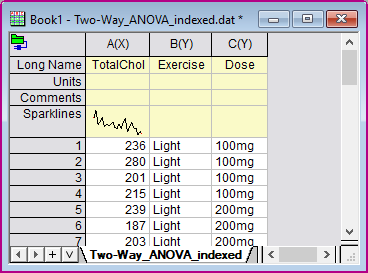
- With a new worksheet active, select menu Data: Connector to File: Text/CSV. Browse to built-in sample data folder and choose file: \\Samples\Statistics\ANOVA\Two-Way_ANOVA_indexed.dat.dat. Import with default settings.
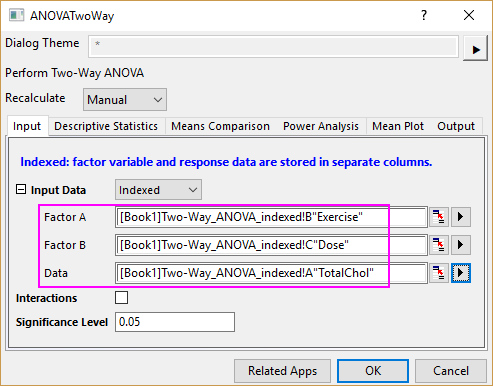
- Select menu Statistics: ANOVA: Two-Way ANOVA. Choose column B as Factor A, column C as Factor B and column A as Data. Click OK button. A report sheet ANOVA2Way1 is created.
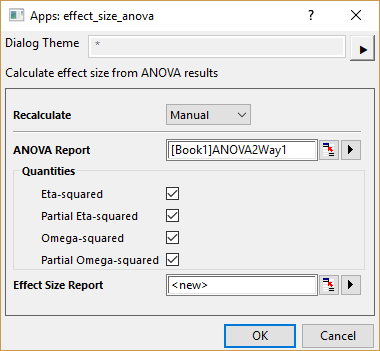
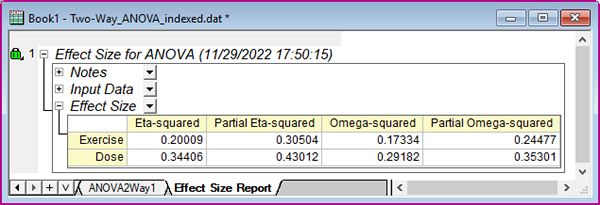
- With report sheet ANOVA2Way1 active, click Effect Size for ANOVA App icon in the Apps Gallery window. In the opened dialog, 4 quantities are available: Eta-squared, Partial Eta-squared, Omega-squared, and Partial Omega-squared. Check all of them. Click OK.