2.42.3.2.1 Stepwise Regression for Analyze Design
Overview
For Analyze Design, the following designs support stepwise regression, which iteratively removes and adds terms to identify the best subset:
- Definitive Screening Design
- Factorial Design
- Response Surface Design
- Mixture Design
Origin provides 4 selection methods for stepwise regression
| Method | Starting Point | Direction | Best For |
|---|---|---|---|
| None | Full model | No selection | Small designs; all terms significant |
| Stepwise | Empty or base model | Forward + Backward | Screening; balancing fit and parsimony |
| Forward | Empty model | Add only | Many candidate terms; sparse true |
| Backward | Full model | Remove only | Near-full model; few non-significant term |
Selection Methods
None
Fits the full model with all specified terms. No automatic term selection is performed.
Stepwise
A hybrid approach that combines forward selection and backward elimination. Terms are added one at a time based on statistical significance, and previously added terms are re-evaluated for removal at each step
How to work
- Start with no terms (or an initial model).
- At each step, evaluate all candidate terms not currently in the model. Add the term with the most significant p-value (below the entry threshold, typically α = 0.15 or 0.10).
- After each addition, re-evaluate all terms already in the model. Remove any term whose p-value exceeds the exit threshold (typically α = 0.15 or 0.20).
- Repeat steps 2–3 until no more terms meet the entry criteria and all terms in the model meet the exit criteria.
Forward Selection
Builds the model by adding terms one at a time, starting from an empty model (or a base model). Only the addition step is performed; once a term enters the model, it is never removed
How to work
- Start with no terms (or specified base terms).
- Evaluate all candidate terms not in the model. Add the term with the lowest p-value that is below the entry threshold.
- Repeat step 2 until no remaining candidate term meets the entry criteria.
When to Use
Use Forward Selection when you suspect only a small subset of terms are significant and want to build the model incrementally. It is computationally efficient and works well when the number of potential terms is large relative to the number of runs
Backward Selection
Starts with the full model containing all specified terms and removes terms one at a time based on statistical significance. Only the removal step is performed; once a term is removed, it is not reconsidered.
How to work
- Start with all terms specified in the Model Terms section.
- Evaluate all terms in the model. Remove the term with the highest p-value that exceeds the exit threshold (typically α = 0.10 or 0.15).
- Repeat step 2 until all remaining terms have p-values below the exit threshold.
Dialog Options
| Method | Select the stepwise regression methods
|
|---|---|
| Alpha to Add | The significance threshold for adding a term to the model. A candidate term enters the model only if its p-value is below this threshold. |
| Alpha to Remove | The significance threshold for removing a term already in the model. A term is removed if its p-value exceeds this threshold. |
| Hierarchical Model |  The option is not avaiable for anlyzing Mixture Design The option is not avaiable for anlyzing Mixture Design
Controls whether the final model respects the principle of hierarchy's lower-order terms (main effects) must be present when higher-order terms (interactions or quadratics) involving those factors are in the model.
|
| Show Model Selection Details | Displays the step-by-step log of the selection process in the output. |
Results of the Stepwise Regression
Stepwise table
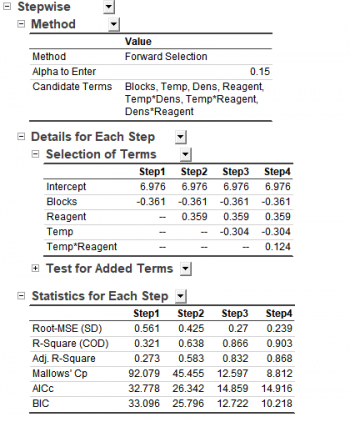
If Show Model Selection Details check box is selected from the dialog, the stepwise tables below will be displayed in the report sheet
Effect Plot
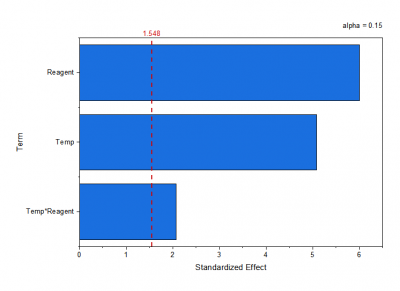
The default alpha level for the Effect Plot is 0.05. When the model is selected using a stepwise method, the alpha level specified for the stepwise procedure is used instead.
- None: alpha = 1 − confidence level
- Stepwise: alpha = alpha to remove
- Forward: alpha = alpha to add
- Backward: alpha = alpha to remove