Hinweis:Dieser Abschnitt ist nur in englischer Sprache verfügbar. Wir bitten um Ihr Verständnis.
3.5 Data Factory
Contents
Summary
Data Factory app is used to generate random data based on specified distribution and parameter, or patterned data.
Tutorial
- Create a new workbook by clicking New WorkBook button
 on the Standard toolbar. First we will show you how to fill column B with random numeric based on Normal distribution.
- Click the Data Factory icon
 in the Apps Gallery.
- In the opened dialog,
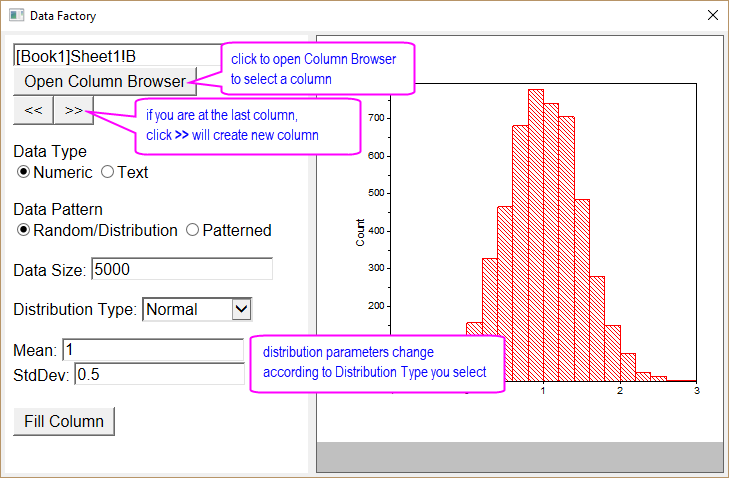
- [Book1]Sheet1!A is auto pre-filled as output column. Click ≫ button to switch to column B.
- Make sure Numeric is selected for Data Type and Random/Distribution is selected for Data Pattern.
- Select Normal for Distribution Type. Specify the distribution parameters as follow:
- Enter 5000 for Data Size
- Set Mean = 1 and StdDev = 0.5.
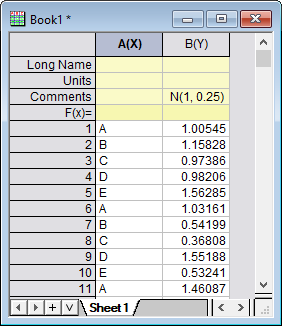
- Click Fill Column button to fill col(B) with random numbers based on Normal distribution specified above.
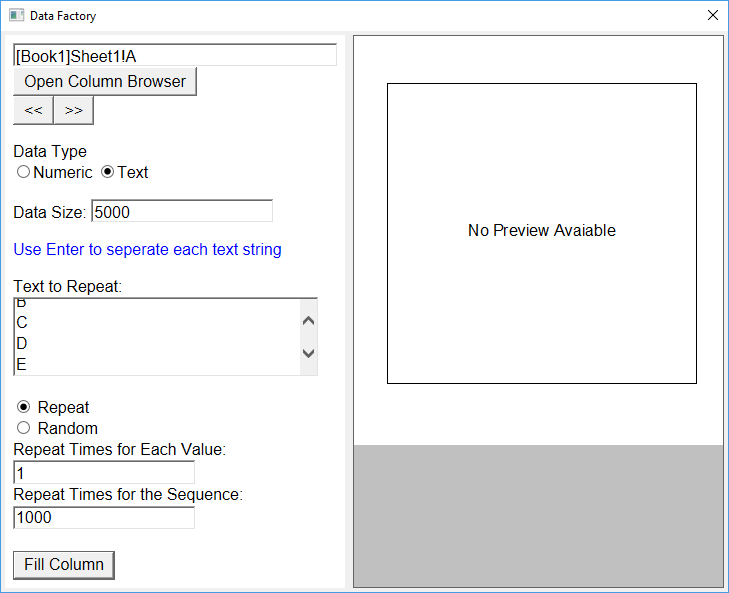
- Now click ≪ button to switch to column A. We will then show you how to fill it with repeated text sequence.
- Select Text for Data Type this time. Specify the text pattern as follow:
- Enter “A B C D E” separated by Enter key.
- Select Repeat radio button.
- Set Repeat Times for Each Value = 1 and Repeat Times for the Sequence = 1000. Note that Data Size is auto calculated as 5000.
- Click Fill Column button to fill col(A) with 5-text sequence repeated 1000 times.