3.5 Data Factory
Contents
Summary
Data Factory app is used to generate random data based on specified distribution and parameter, or patterned data.
Tutorial
- Create a new workbook by clicking New WorkBook button
 on the Standard toolbar. First we will show you how to fill column B with random numeric based on Normal distribution.
- Click the Data Factory icon
 in the Apps Gallery.
- In the opened dialog,
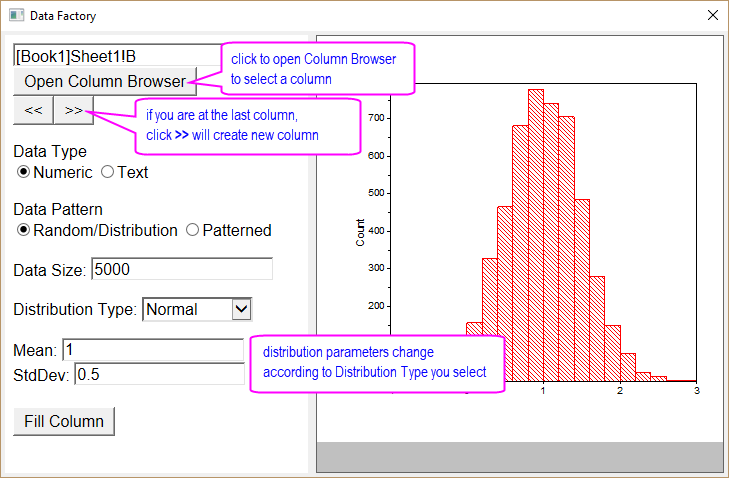
- [Book1]Sheet1!A is auto pre-filled as output column. Click ≫ button to switch to column B.
- Make sure Numeric is selected for Data Type and Random/Distribution is selected for Data Pattern.
- Select Normal for Distribution Type. Specify the distribution parameters as follow:
- Enter 5000 for Data Size
- Set Mean = 1 and StdDev = 0.5.
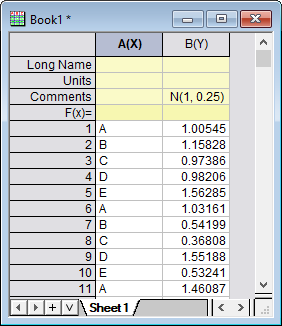
- Click Fill Column button to fill col(B) with random numbers based on Normal distribution specified above.
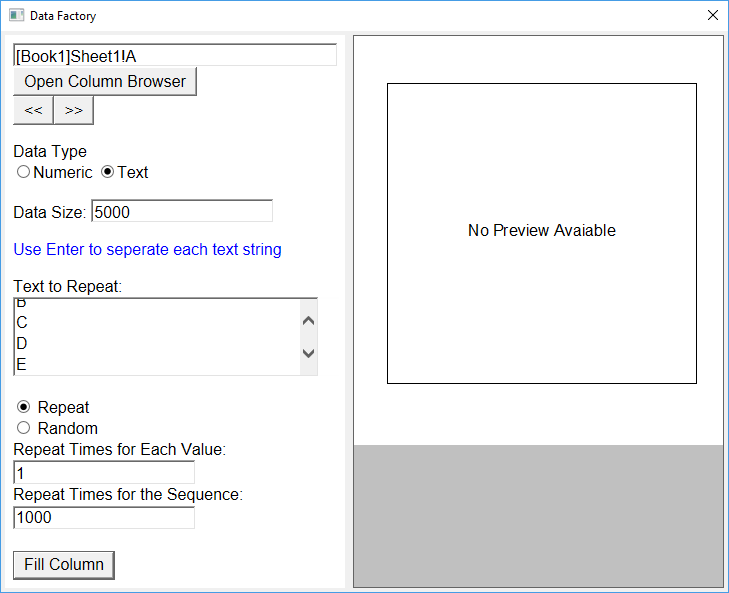
- Now click ≪ button to switch to column A. We will then show you how to fill it with repeated text sequence.
- Select Text for Data Type this time. Specify the text pattern as follow:
- Enter “A B C D E” separated by Enter key.
- Select Repeat radio button.
- Set Repeat Times for Each Value = 1 and Repeat Times for the Sequence = 1000. Note that Data Size is auto calculated as 5000.
- Click Fill Column button to fill col(A) with 5-text sequence repeated 1000 times.