2.72 Calcium Transient Analysis
Contents
Summary
The App Calcium Transient Analysis is used to perform calcium transient analysis
Tutorial
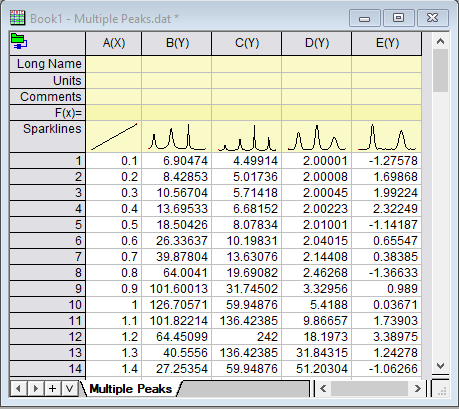
- New a workbook, and then select Data: Connect to File > Text/CSV to open the sample file \Samples\Curve Fitting\Multiple Peaks.dat. There are four samples(Y columns).
- Click the app icon in App Gallery to open the dialog. With the dialog opened, a new workbook will also be created.
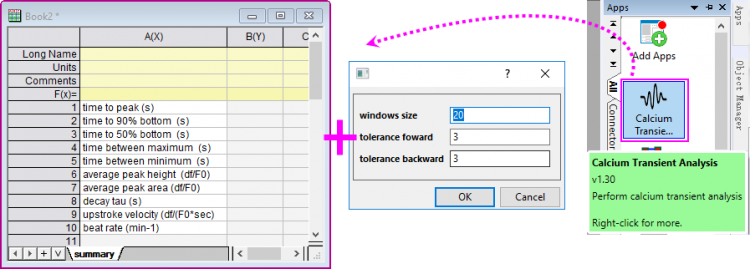
- In this mini dialog, you can set the window size to specify the window size to search local maximum; set the tolerance forward and tolerance backward to specify the tolerance value to seach for the beginning and end of the peak.
- The rows in worksheet indicate that which result values will be output to summary sheet for each column.
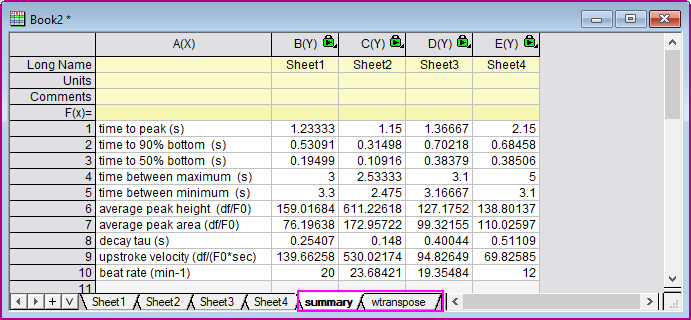
- Keep the default settings. Click OK button, a new book will be created with four sepereate sheets(for 4 source columns), one summary sheet and its transposed sheet.
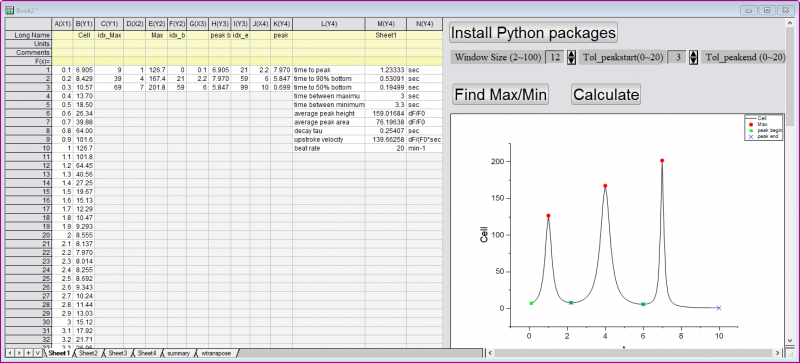
- In each sepereate sheet, there is a panel beside the result columns. You can click the buttons/arrows to reset the controls and click Calculate button to perform the analysis and preview the corresponding transient results in the graph.
- Go to the sheet Summary or its reansposed sheet wtranspose to check the final results.