6.1 CSV Connector
Summary
This CSV Connector app can be used to import CSV file. (*.csv) from local or online. This app is pre-installed in Origin. You can launch it from
- menu Data: Connect to File: Text/CSV, or
- the CSV Connector App icon on the Connectors tab of the Apps Gallery
For more information of importing CSV data, please refer to this document.
Tutorial
- Create a new Workbook. Select menu Data: Connector to File: CSV. Browse to Origin’s grogram folder and select CSV file
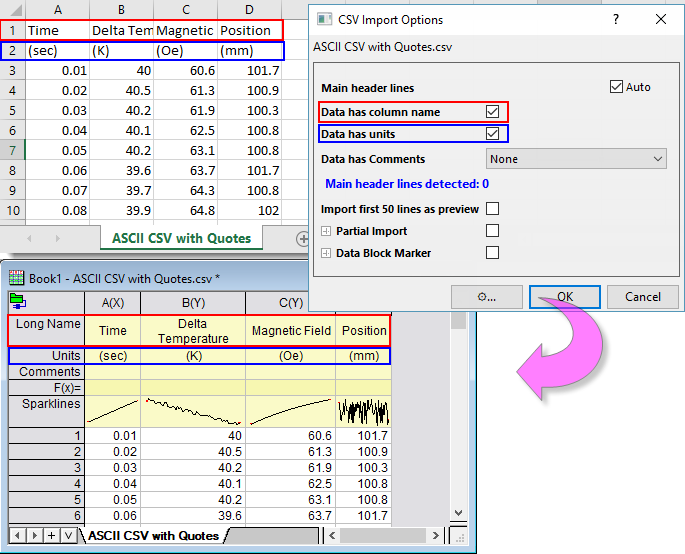
\Samples\Import and Export\ASCII CSV with Quotes.csv. - In the Import Options dialog that opens, Origin auto-detects the optimized settings:
- Main header lines is checked and Origin auto-detects there is no main header in this file
- Data has column name is checked so Origin auto-detects 1st row as Long Name
- Data has units is checked so Origin auto-detects 2nd row as Units
- Data has Comments is set to None, which means no Comments line is detects in the file