2.43 Correlation Shift
Summary
The App Correlation Shift is used to align datasets by finding delay corresponding to maximal correlation
Tutorial
- Start this tutorial with the app Correlation Shift installed. If you have not installed this app, please click Add Apps button in Apps Gallery to open App Center to search and install the app.
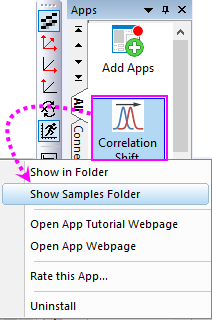
- Right-click on the app icon to select Show Samples Folder to open the sample folder and drag-and-drop the sample file "Xcorrel.opj" into Origin workspace to open it.
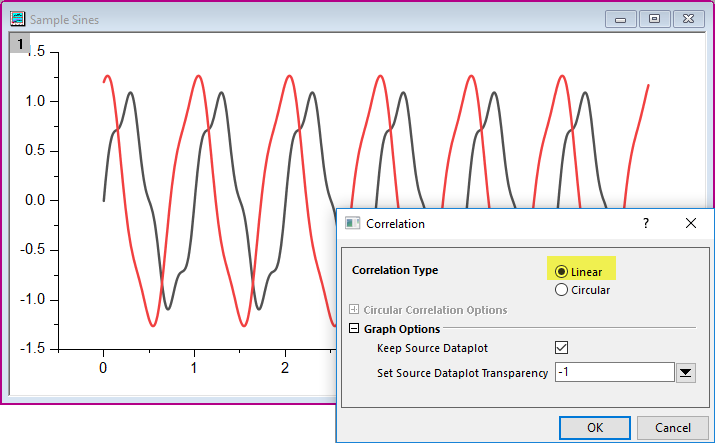
- In this project, activate the graph window "Sample Sines", and then click the app icon to open the app dialog. Choose Linear for Correlation Type option.
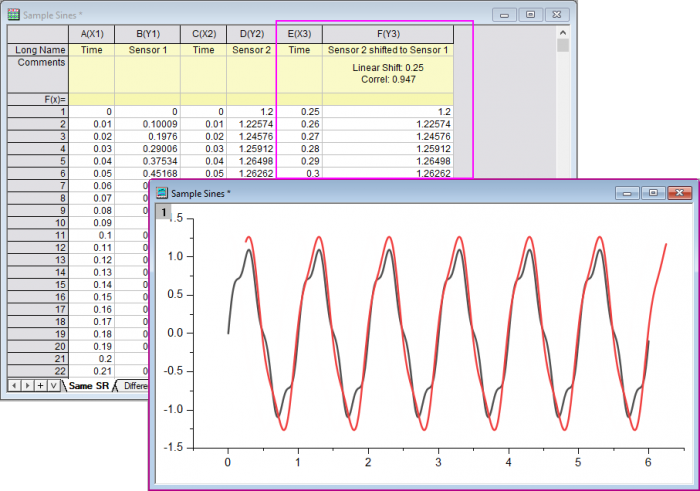
- Click OK button to shift the curve "Sensor 2" to "Sensor 1". And, two result columns will be output to the source worksheet.