Hinweis:Dieser Abschnitt ist nur in englischer Sprache verfügbar. Wir bitten um Ihr Verständnis.
2.57 ANOVA from Summary Data
Contents
Summary
This App performs ANOVA from summary data including sample size, mean and standard deviation. It currently supports one-way ANOVA (not repeated measures).
Tutorial
- Right-click on the ANOVA from Summary Data icon
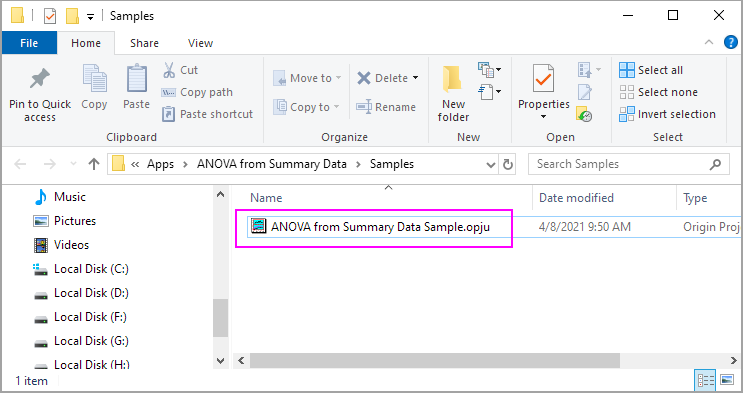
 from the Apps panel, and select Show Sample Folder to open the sample folder.
- Open ANOVA from Summary Data Sample.opju in the sample folder.
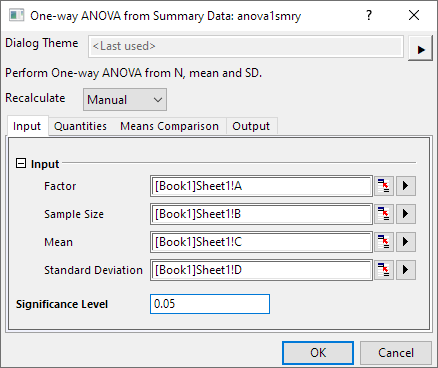
- Highlight Column A to D in the Sheet1 of Book1, then click on ANOVA from Summary Data icon to open the dialog. Use dialog default setting, and click OK.
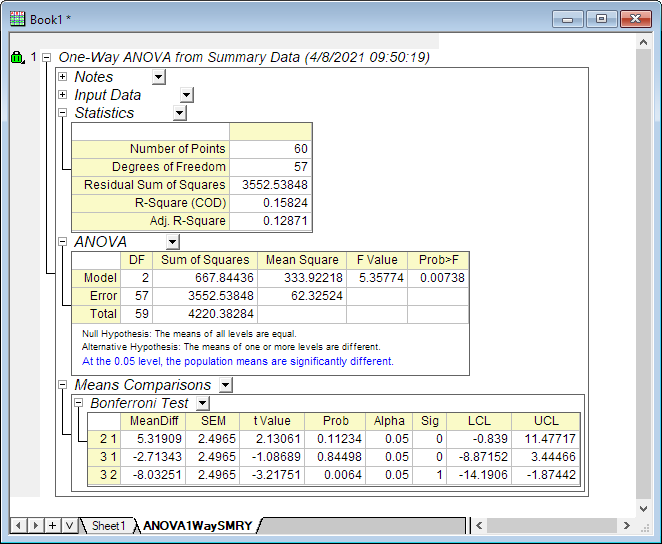
- You will get the report in the ANOVA1WaySMRY sheet.