2.30 3D Convex Hull
Summary
The 3D Convex Hull app is used to calculate the convex hull envelope (boundary) for a given set of XYZ scatter points.
Tutorial
In this tutorial, we will generate a set of random data points and use 3D Convex Hull app to plot the convex hull envelope and output its volume and area.
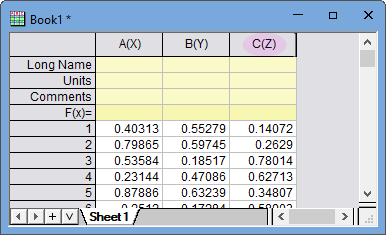
- Start from a new project. With the empty worksheet active, click Add New Column button
 on the Standard toolbar to add a third column. Click on this new column and select Set as Z button
  from the popped-up mini toolbar.
- Highlight all 3 columns and click button
 on the Standard toolbar to set column values with uniform random numbers. Now we have a set of XYZ data.
- Highlight all 3 columns and select menu Plot > 3D: 3D Scatter to plot a 3D Scatter graph.
- With the graph active, click 3D Convex Hull app icon
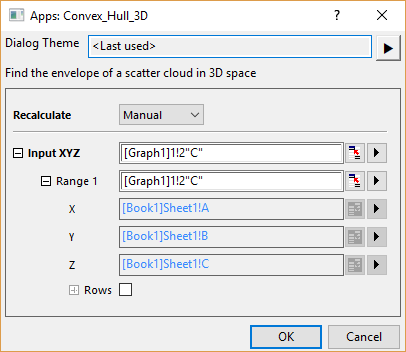
 from App Gallery. A Convex_Hull_3D dialog will open. The 3D Scatter is auto-picked as Input XYZ.
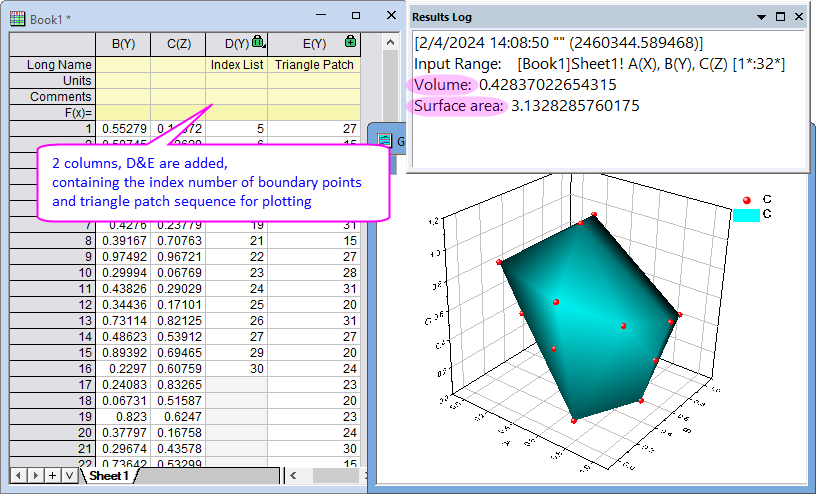
- Click OK button to plot the convex hull as a 3D Surface onto the source graph directly. And the calculated Volume and Surface Area will be output to Results Log.