1.307 FAQ-1219 Why does my graph look very different in Origin 2025b from previous versions. How to restore?
why-graph-looks-different-in-2025b
Last Update: 8/5/2025
If your graph looks different in Origin 2025b from the previous versions, such as:
- Wider graph page (aspect ratio changed)
- Smaller margins around the graph
- Font sizes for axis titles, tick labels, etc. appear different
- Layer frame now appears around axes
- Axis line thickness has changed
- Tick labels auto-rotate 45° if overlapping
- ... and more
or if you set graph system theme but new graph does NOT seem to have it applied, ...
it's because In Origin 2025b, we introduced the new Graph Options dialog to give you better control over global graph settings. Along with this, we pre-shipped a new set of default values that differ from earlier versions.
To restore the classic look used in previous versions:
- Go to Preferences: Graph Options.
- Click the Reset button.
- Select Reset All to Classic from the fly-out menu. This will revert most key formatting options to match Origin 2025 defaults.
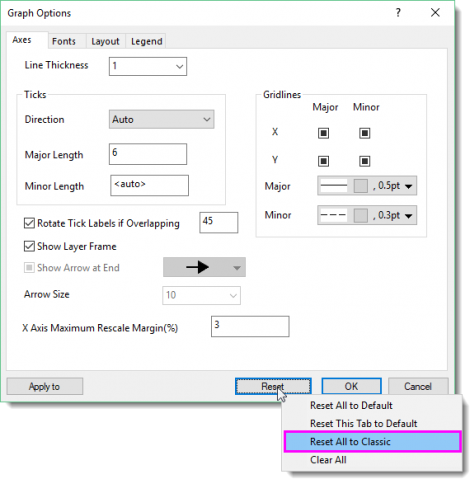
Note:
- Some built-in graph templates were also updated in 2025b. Even after restoring classic settings, the appearance may not exactly match older versions, but it should be very close.
- If you prefer, you can also click the Reset button and choose Clear All so most settings are auto which means decided by the old system theme and graph template. Then Define your own settings on each tab.
- The system variable '@GGO' controls which types of templates will be affected by these settings:
- '0' = none
- '1' = system templates
- '2' = user templates
- '4' = app templates
- '8' = extended templates
These values can be combined (e.g., '3' = system + user templates).
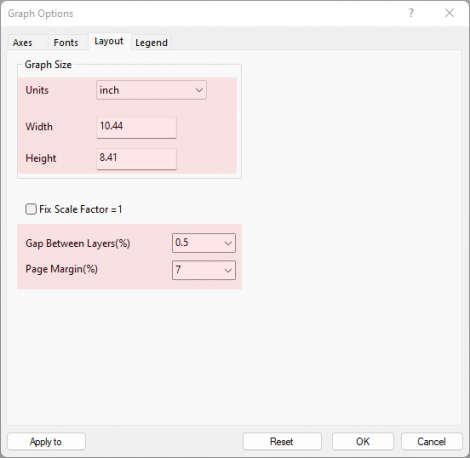
To restore only the layout (page size and margins):
If you like most of the new defaults but want to adjust just the graph layout, go to the Layout tab in the Graph Options dialog and apply the following values:
Keywords:old version style, graph size ratio, margin, axis frame, stats mode, default mode, default graph page, page layout