1.301 FAQ-1199 What should I do if I don't want to keep the dark mode color when exporting graphs?
Turn-off-Dark-Mode-for-Export
Last Update: 8/29/2024
By default, if you are in dark mode, you will get WYGIWYS when you export a graph. If you don’t want to keep the dark mode color for exporting:
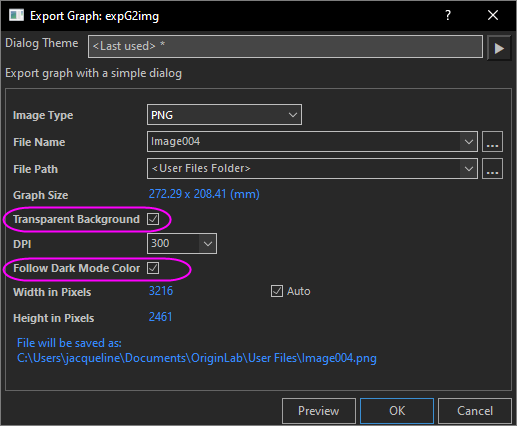
- When select menu File: Export Graph or Export Graphs (Advanced) to export a graph, uncheck Follow Dark Mode Color checkbox.
Note that if the background color set in the Plot Details dialog is Auto (the default settings), you can use Transparent Background checkbox in the export dialog to control whether the exported graph background will keep the white color, or use transparency.
Or
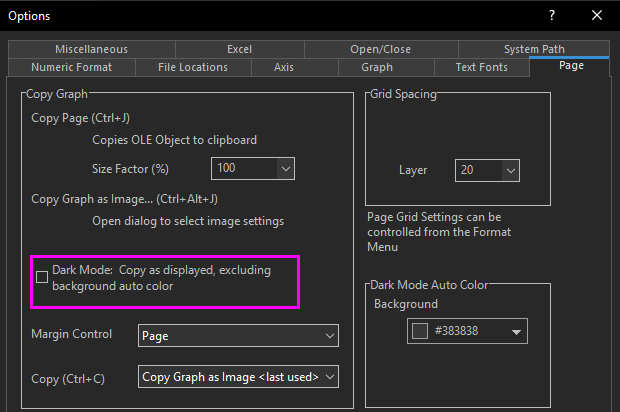
- For global settings, select menu Preferences: Options. On the Page tab, uncheck Dark Mode: Copy as displayed, excluding background auto color checkbox. This will export graphs following the light mode colors. And if the background color in Plot Details dialog is set to Auto (the default settings), it will be exported as white background rather than black.
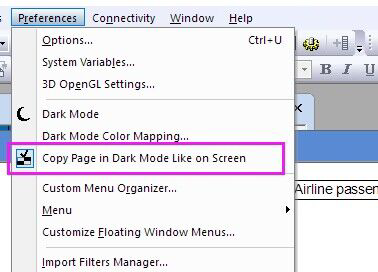
Furthermore, if you copy a graph page and then paste it to other application, e.g. PPT, you can de-select menu Preferences: Copy Page in Dark Mode Like on Screen to export the graph as in light mode.
Keywords:dark mode, light mode, dark colors, export graph, copy page, turn off dark color for exporting, export as light mode