1.174 FAQ-841 How to show trailing zeros in axis tick labels, such as 1.0 for 1?
Trim-Zero-Integer-Tick-Labels
Last Update: 8/3/2020
By default, Origin keeps the trailing "0" to indicate the precision. If you want to remove the trailing "0" in axis tick label, you can
- Select menu Preferences: Options.
- Go to Axis tab. Check No Trailing Zero and Zero is "0" (if your axis includes original point) .
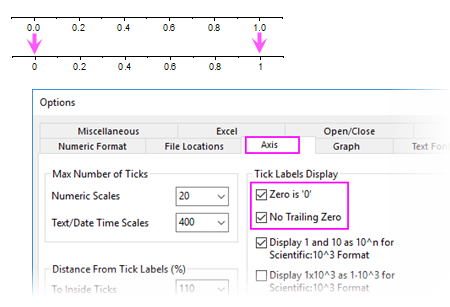
Note:
- you can also use system variable @TLC to control whether to remove trailing zeros. The default value of this variable is 0.
- For Origin 2020 and 2020b, by default, Origin will trim the trailing zeros by default: the system variable @TLC has been set to 3 and the check box No Trailing Zero and Zero is "0" has been checked.
|
 | In the previous versions before Origin 2020, if you want to remove trailing "0" in integer tick labels:
- Double click on the axis to open the Axis dialog.
- Go to the Tick Labels tab], and then Display sub-tab. Set Display to Custom and then set Custom Format to *
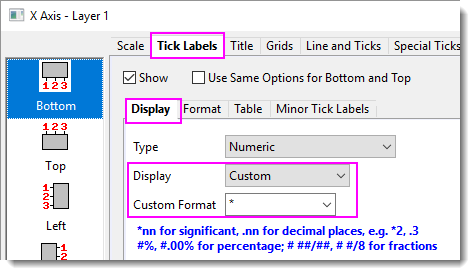
Note: You can combine * at the end of other syntax. For example,
- .1* means keep 1 decimal places and trim unnecessary zeros
- *2* means keep two significant digits and trim unnecessary zeros
|
Keywords:significant digit, label, axes, unnecessary zero