1.204 FAQ-946 How to show the frame for the 2D graph layer?
Show-graph-Frame
Last Update: 4/19/2019
By default, most 2D graphs created from built-in templates will only show bottom X axis and left Y axis. Origin provides several methods to show top and right lines for the layer frame,
Turn on Opposite Lines for Current Graph
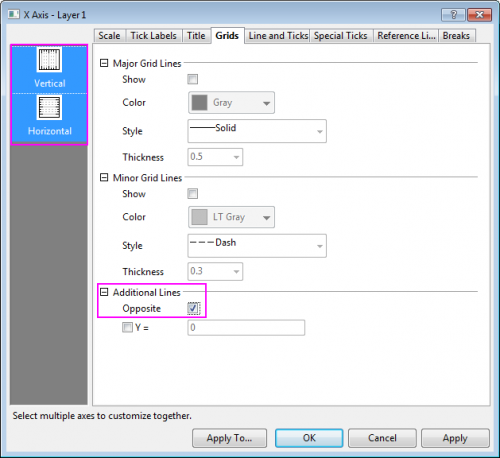
- Double-click on the X/Y axis to open the Axis dialog, go to Grids tab. Hold down CTRL key and select Vertical and Horizontal icon in the left panel, on the right check the Opposite check box under the Additional Lines branch. Click Apply button.
Always Turn on Opposite Lines for Graphs as Default Setting
- With the graph activated, select Preferences: Theme Organizer... menu to open Theme Organizer. In this dialog, go to Graph tab, find the Opposite Lines theme, click the Apply Now button to apply this theme to current graph.
Besides, you can use Apply Theme to drop-down list to apply this theme to more graphs in current project.
If you want all graphs you create in future to have all axes on, you can right-click on the theme item to select Set as System Theme item from the context menu.

Show Frame
- With the graph layer activated, select View: Show: Frame menu item.
 | Beginning with Origin 2019b, the frame will follow the line style and color of the X and Y axes.
|
Keywords:frame, border, Top X, Right Y, four sides, square, theme, system theme