2.67 FAQ-783 Can I select and hide worksheet columns by label or index?
Select_Column_by_Label_or_Index
Last Update: 10/20/2022
You can select (and optionally hide) columns in the active worksheet by column label or by column index:
- Click Edit: Select or Column: Select Columns to open a dialog box in which you can specify:
- Selection mode.
- Selection string and condition if selecting by label, or columns to select and skip from starting column, if selecting by index.
-
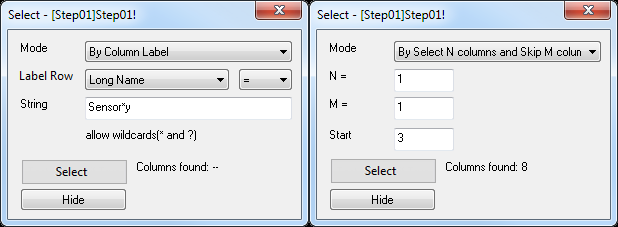
- Click the Select button to select the columns that meet your selection criteria.
- Optionally, you can Hide the selected columns. To "unhide" the columns, select Edit: Undo or select the entire worksheet, then right-click and choose Hide/Unhide Columns: Unhide.
Keywords:label rows, worksheet, data selection, skip, hide, unhide