1.230 FAQ-997 How to change the shape of axis break?
Remove-Gap-Axis-Break
Last Update: 3/16/2020
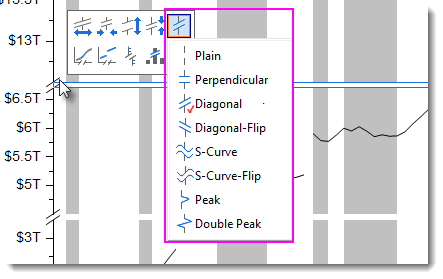
The axis break is added as diagonal symbol by default.
To change the axis symbol to other shape
- After adding the break, click on it and select Axis Break Symbol botton on the mini toolbar that appears.
- Select a desired symbol from the sub-menu list.
To remove break gap as below graph

- With the graph active, open the Script Window (from menu, Window: Script Window) if it is not already open.
- Copy and paste below LabTalk command layer.x.breaks.gap in the Script Window. Press Enter to run it.
layer.y.breaks.gap=0
Keywords:axis break, gap, axis break properties, plain break, perpendicular, diagonal, diagnal flip, S curve, S curve flip, peak like break, double peak like break