2.137 FAQ-1186 How to insert one row for every certain number of rows?
Insert-Row-of-Every-N-Rows
Last Update: 7/25/2023
To insert one row for every N rows,
- With the worksheet active, select menu Worksheet: Worksheet Query.
- In the Worksheet Query dialog that opens, enter following Condition
mod(i,N)=1&&i!=1
to select every N rows. For example, if you want to insert one row for every 5 rows, enter mod(i,5)=1&&i!=1
in the Condition edit box.
- Click Test -- select if true button to test the condition. This will highlight every N rows.
- In the Output group, select Select radio button. Click OK button to close Worksheet Query.

- Right click on any one of the selected rows and select Insert Row from the context menu. This will insert one row before each shighlighted row.

 | - You can insert one column for every certain number of columns in a similar way. For column selection, you can use menu Edit: Select.
- You can also press Ctrl key and use mouse to select discontinuous rows or columns, and then use Insesrt button on the mini toolbar to insert row or column before each selection.
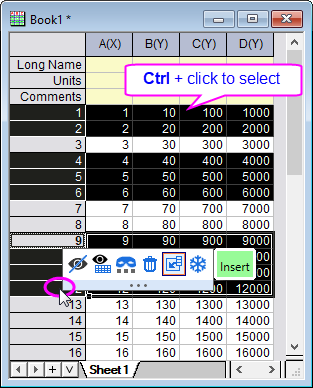
|
Keywords:insert rows, insert columns, evenly insert, select every spaced rows