1.112 FAQ-659 Is there a way to create tick marks and labels at user specified locations only on my axes?
Last Update: 7/3/2018
Custom-Tick-Marks-and-Labels
By default Origin creates evenly spaced tick marks and labels. To show ticks and tick labels only at user specified locations,
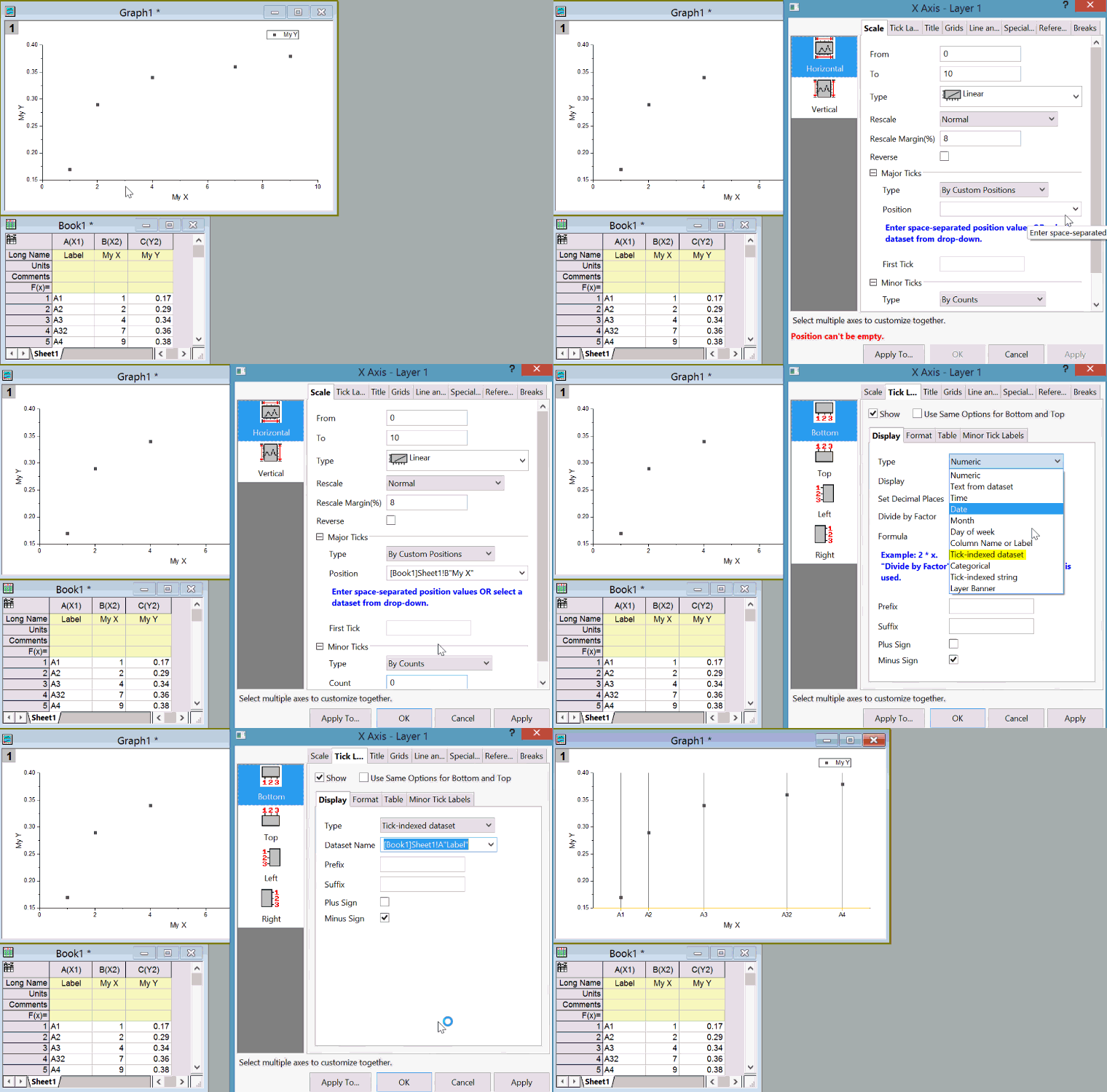
- Double click the axis or select Format:Axes:X Axis menu.
- On Scale tab, change the Type of the Major Ticks into By Custom Positions (or By Dataset in older versions)
- In Position box (or Dataset box in older versions), either type in space separated values or use the dropdown list to pick the column where axis location values are in.
- Click Apply to see the effect.
- If you want to show user-defined tick labels in these positions, go to Tick Labels tab
- Go to the 2nd level Display tab, Change the Type into Tick-Indexed Strings, and enter space separated labels; or if these tick label text are in a column, change Type into Text from Dataset and pick the corresponding tick label column.
- Click OK to close the dialog.
-
Keywords:Special Tick, Tick Position, Tick Labels