 (on Tools toolbar docked at the left-hand side of the workspace). Press Ctrl key and drag out a rectangle area on the graph. It will create an enlarged graph. Moving the rectangle box in the source graph will update the enlarged graph dynamically.
Last Update: 11/23/2025
Origin provides 3 methods to create a zoom plot for 2D graph.
Compare of 3 methods
| Work for multi-layer graph? | zoom graph can auto-update after inserted to source graph? |
Start from | |
|---|---|---|---|
| Method 1: Ctrl + Zoom to select region on graph and then copy layer | Y | N | Worksheet |
| Method 2: Zoom Inset App | Y | Y | Graph |
| Method 3: Zoom plot type from Plot menu | Y | Y | Graph |
(on Tools toolbar docked at the left-hand side of the workspace). Press Ctrl key and drag out a rectangle area on the graph. It will create an enlarged graph. Moving the rectangle box in the source graph will update the enlarged graph dynamically.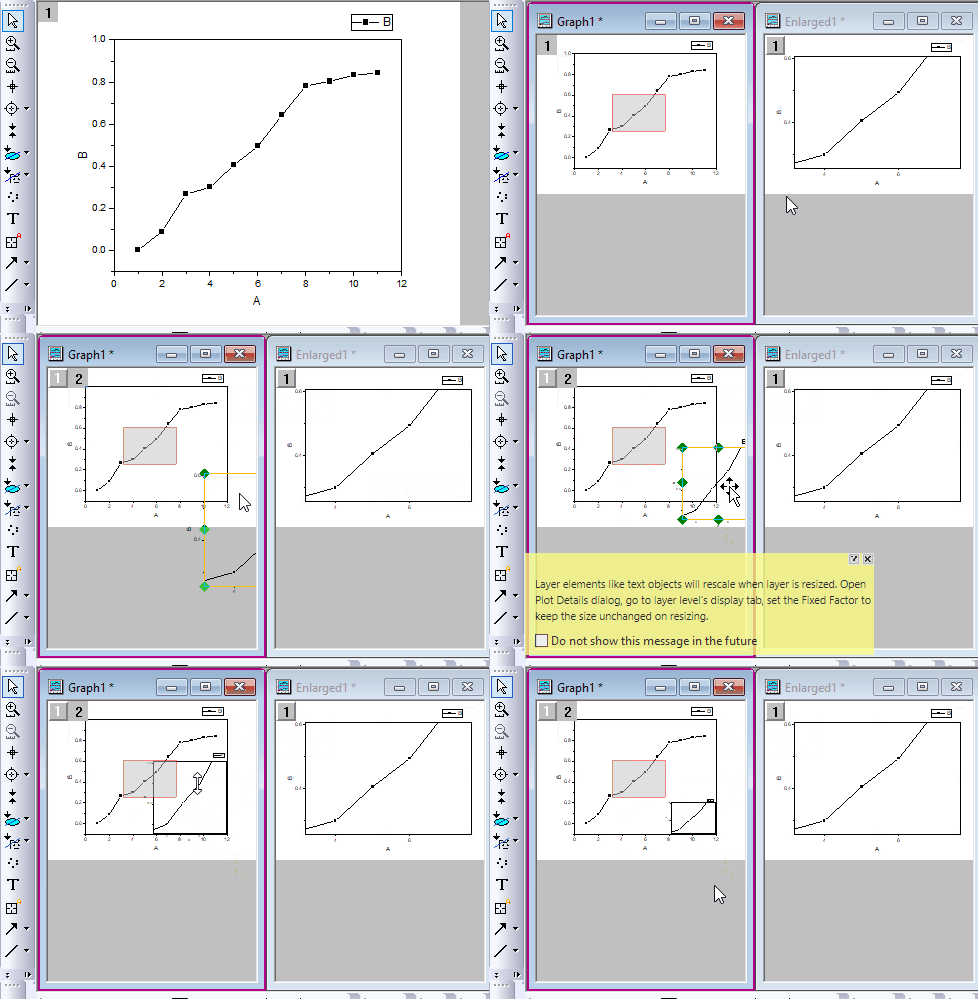
You can download Zoom Inset App from File Exchange page.
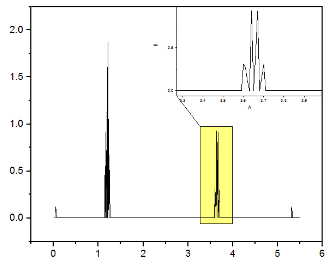
Origin provides a build-in zoom graph template. You can access it by selecting menu Plot: Multi-Panel/Axis.
Keywords:zoom graph, insert panel, enlarge part