3.136 FAQ-805 How to compare the curves before and after recalculation?
Compare-Curves
Last Update: 9/21/2017
Origin 2016 SR1 supports copy and paste plot into the graph window. This enables user to quickly compare the curves before and after recalculation.
For example
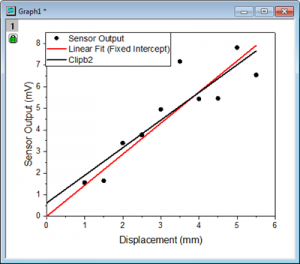
- Do a linear fit on scatter plot --> The fitted curve (red line) is created.
- Click on the fitted curve. Press Ctrl+C to copy it.
- Press Ctrl + V to paste the line in the same graph --> A black line, Clipb2, is pasted.
- Click the green lock and choose Change Parameters... from the context menu.
- In the opened dialog, set Intercept Fix at 0.
- Now user can visually compare fitted curves for fixed intercept or not fixed one.
Keywords:recalculate, compare curves, change parameter